You are here:
Access Versions of a Template and Filter Templates More Intuitively
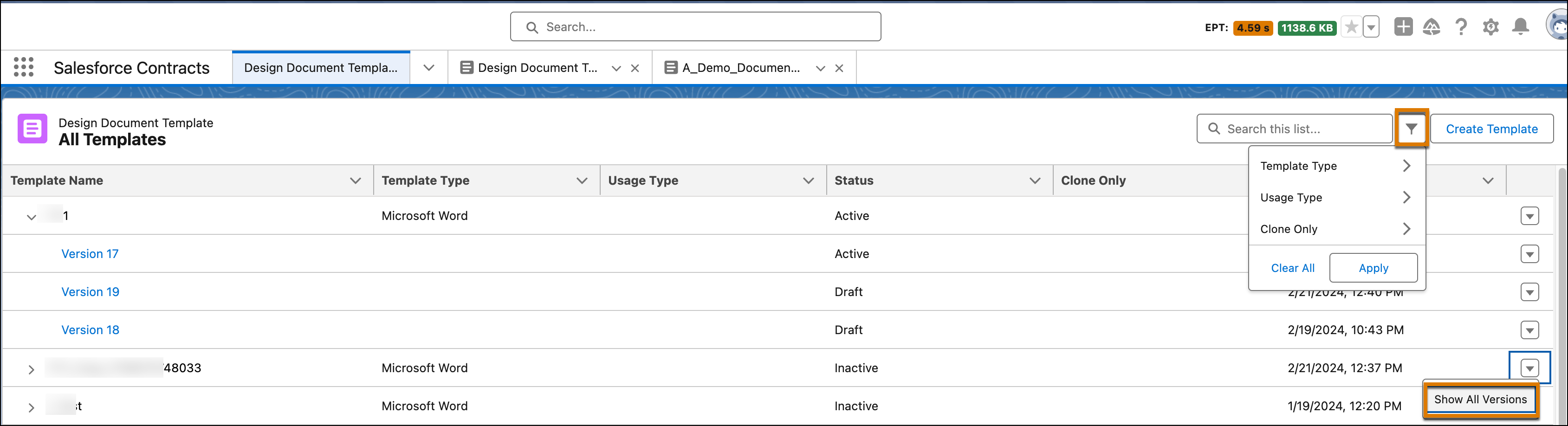
Use the enhanced Design Document Template page to filter templates and and access all template versions. Click a template name in the Design Document Template tab to view the three latest versions, with the active version at the top. To view all document template versions in descending order, click Show All Versions. You can also view template details such as the name, status, and last modified date. Within the Design Document Template view, filter templates by Template Type, Usage Type, or Clone Only to easily locate templates.
Where: This change applies to Lightning Experience in Enterprise, Unlimited, Professional, and Developer editions.
Who: To use Design Document Template, users need the DocGen Designer permission set.
How: Go to Design Document Template and filter templates or click Show All Versions.