
You are here:
Use Field Mapping XML to Create and Update Contracts from an Opportunity, Order, or Quote
When you create a contract from an opportunity, order, or quote using Create Contract action button, the Salesforce Contracts application automatically maps the contract record to the object record based on the defined field mappings. If the parent-to-parent and child-to-child mappings are defined for the opportunity object, then the Create Contract API picks the parent Opportunity and related child objects such as Opportunity Products and creates the Contract and Sales Contract Lines objects.
Prerequisites to Create and Update Contracts from an Opportunity, Order, or Quote
You must configure and deploy field mappings XML to map fields between the opportunity, quote, and order standard objects and the contract object to be able to create and update contracts from these objects.
-
Use the Field Mapping XML to map fields between standard objects opportunities, order, and quote with the contract object.
 Note Salesforce Contracts provides a sample field mapping XML file with field mappings for Opportunity, Quote, and Order. For more information, see Sample Object Hierarchy Relationships Mapping in XML.
 - Workflow to Deploy Field Mappings XML Via Postman or Workbench.
-
Verify the following:
-
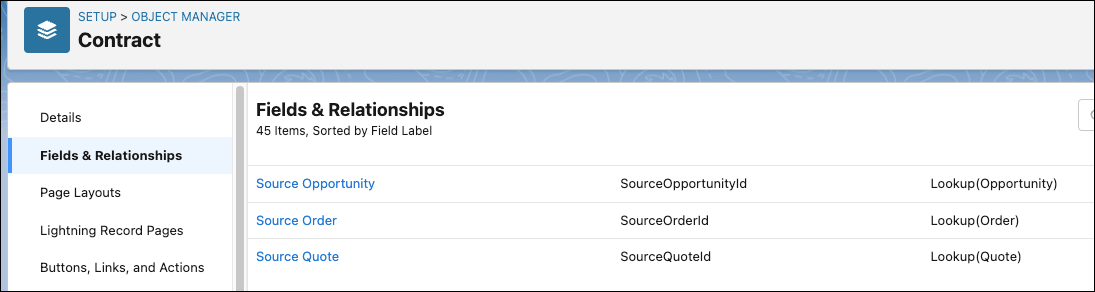
When you enable the ContractManagement license, the default source fields Source Opportunity, Source Order, and Source Quote are automatically created in the contract object.
-
When you create a contract from an opportunity, order, or quote using the Create Contract action button:
-
The contract record automatically indicates the source object by linking the contract to the object. This helps in identifying the source object for the contract.
-
The Is Associated with CLM flag is automatically set to true. The flag indicates that the contract record is created using the Salesforce Contracts application. For more information, see View 'Is Associated With CLM'.
-
-
If you want to generate a contract document version along with the contract creation you must configure a few contract type config settings. For more information, see Auto Generate Document On Contract Creation.
