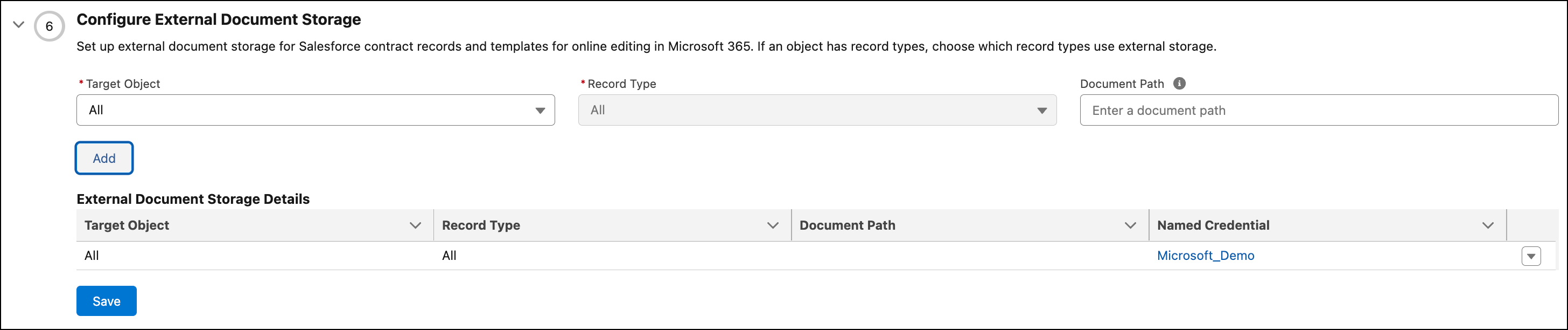
設定 Salesforce 契約記錄和範本的外部文件儲存空間,用於在 Microsoft 365 中線上編輯。指定目標物件和記錄類型以決定哪些記錄使用外部儲存空間。這麼做可確保文件的適當組織與存取權。目標物件和記錄類型的組合必須是唯一的,無法重複。
必要版本
提供版本:Lightning Experience
提供版本:Enterprise、Unlimited 及 Performance Edition。
所需的使用者權限
若要存取 Microsoft 365 與 Azure 整合引導式設定
CLM 管理員使用者
備註 當您搭配 Microsoft 365 和最低權限存取模式使用外部文件儲存空間時,只有建立 Microsoft 365 文件的文件設計師可以依預設編輯文件。若要在多個設計師在相同組織中工作時啟用共用編輯,請在 Microsoft SharePoint 中建立專屬資料夾、將存取權授與必要設計師,並在 Salesforce 中設定指向此資料夾的個別外部文件儲存組態。因此,在支援協同合作時保留最低權限安全性模型。
We use three kinds of cookies on our websites: required, functional, and advertising. You can choose whether functional and advertising cookies apply. Click on the different cookie categories to find out more about each category and to change the default settings.
Privacy Statement
Required Cookies
Always Active
Required cookies are necessary for basic website functionality. Some examples include: session cookies needed to transmit the website, authentication cookies, and security cookies.
Functional Cookies
Functional cookies enhance functions, performance, and services on the website. Some examples include: cookies used to analyze site traffic, cookies used for market research, and cookies used to display advertising that is not directed to a particular individual.
Advertising Cookies
Advertising cookies track activity across websites in order to understand a viewer’s interests, and direct them specific marketing. Some examples include: cookies used for remarketing, or interest-based advertising.