Get Help for Salesforce Trade Promotion Management
Trade Promotion Management (TPM) helps you oversee the promotions that you run for your
retailers, from planning to completion, to ensure that each promotion achieves its objectives.
Use TPM to streamline your team’s efforts, overcome the complexities of running several
promotions concurrently, and unlock maximum results.
Required Editions
Available in: Lightning Experience
Available in: Enterprise and Unlimited Editions where Consumer Goods
Cloud is enabled
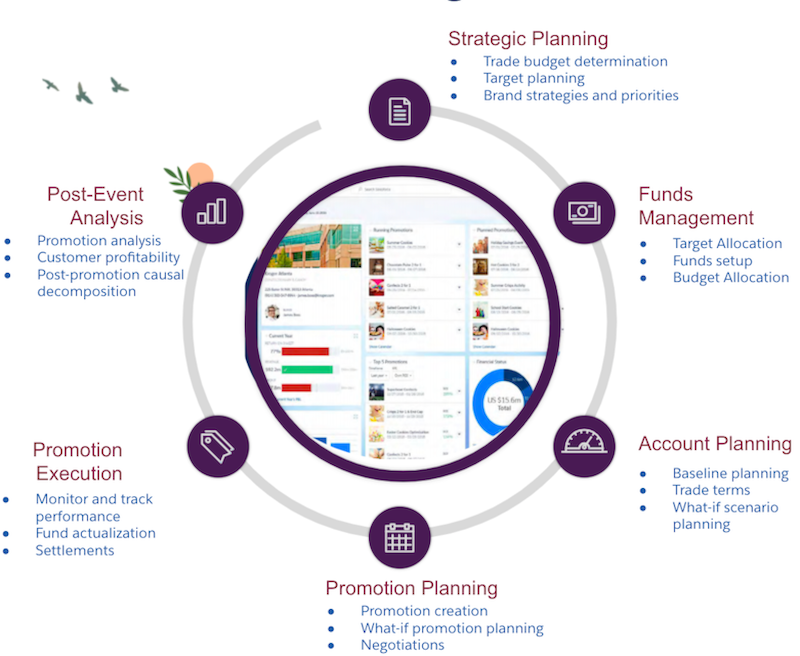
Here’s how TPM can help you manage each phase of the promotion lifecycle.
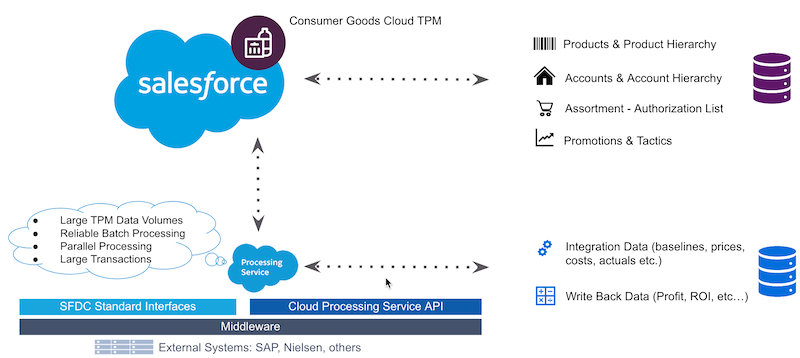
Business process data, such as data related to account, product, sales organization,
assortments, promotions, and claims, is stored in Salesforce. Data that is used for P&L
calculations, such as KPIs, is stored in a processing service.
Here’s a simplified version of TPM architecture.
In Salesforce, data is stored in corresponding objects, which are then synchronized with the
processing service using the SF Data Sync
process.
Use integration APIs to load data in processing services. You can update the data in
processing services after a TPM calculation process is complete. Processing service tables are
generic and contains different data characteristics, and so the data is stored based on their
type and usage. Use KPIs to retrieve data from processing services.
We use three kinds of cookies on our websites: required, functional, and advertising. You can choose whether functional and advertising cookies apply. Click on the different cookie categories to find out more about each category and to change the default settings.
Privacy Statement
Required Cookies
Always Active
Required cookies are necessary for basic website functionality. Some examples include: session cookies needed to transmit the website, authentication cookies, and security cookies.
Functional Cookies
Functional cookies enhance functions, performance, and services on the website. Some examples include: cookies used to analyze site traffic, cookies used for market research, and cookies used to display advertising that is not directed to a particular individual.
Advertising Cookies
Advertising cookies track activity across websites in order to understand a viewer’s interests, and direct them specific marketing. Some examples include: cookies used for remarketing, or interest-based advertising.