
You are here:
Manage Multiple Markets
You can segment data, business processes, and configurations for multiple markets without creating multiple Salesforce orgs by using sales organizations. You can group data according to geography, product division, or account team setup. For example, you can create a sales organization for each country that you do business in or to segment your master data, such as accounts and products, and transactional data such as promotions and claims.

When you use a Salesforce org for each country, you must set up and maintain permissions and policies individually for each org. In contrast, when you use multiple sales organizations under a single Salesforce org, you can manage these markets as a single business.
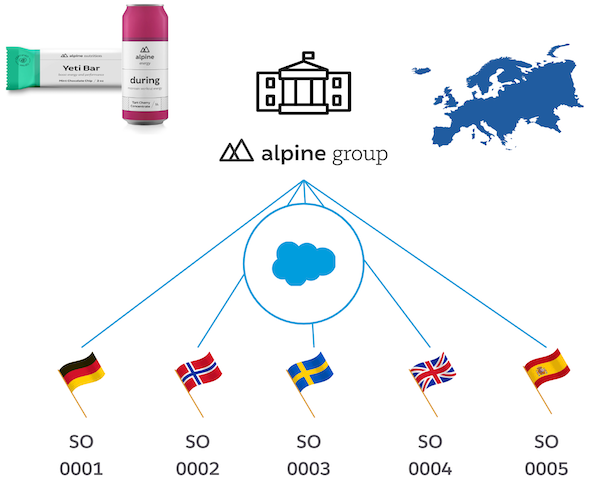
Typically, a key account manager (KAM) is assigned to one sales organization, and business admins are assigned to multiple sales organizations. A user can access only the data for the sales organizations that they’re added to.
A sales organization can include up to four languages. When you create a promotion record for a sales organization, you can write the descriptions in any of its configured languages. If you enter a description in a language that isn’t configured, it’s translated into the sales organization’s default language.
- Considerations for Choosing a Salesforce Org Strategy
You have three strategies to choose from when you set up Salesforce orgs with Trade Promotion Management (TPM). - Create a Sales Organization
Use a sales organization to segment your data according to geography, product division, or account team. For example, you can create a sales organization for each country that you do business in and define the details, such as currency, language, and products. - Calendars
Business years define the annual time frame for your sales organization. You can align your business year with the Gregorian calendar, or have business years range from 360 to 380 days and begin on any chosen day of the month. - Weekday Share Profiles
Based on how your promotions performed, create a weekday share profile (WDSP) to distribute KPIs, such as the baseline volume, among the days of a week or subperiods. Analyze the KPI distribution to understand an account’s performance on each day of a week or a subperiod and plan your promotions accordingly. You can define WDSP as either a percentage or absolute value. You can use both business year and custom periods.
