Use Business Rules Engine components and features in your workflows to simplify complex
lookups and to automate business decisions. Here's an example of how Business Rules Engine
components work with a workflow.
Required Editions
Available in: Lightning Experience
Available in: Enterprise, Unlimited, and Developer Editions
for clouds that have Business Rules Engine enabled
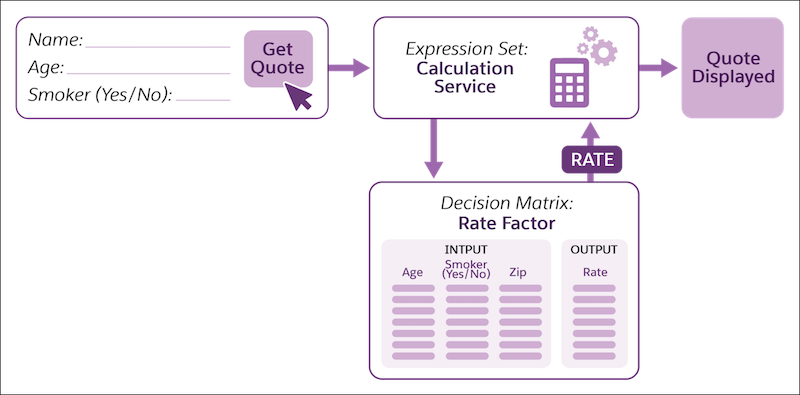
Example Let's look at a workflow that provides a user with a quote for health insurance.
Here's how the workflow
is set up to gather inputs from a user and to return the insurance premium quote to the
user:
A form in the workflow gathers the user's age, ZIP code, and smoking status.
After the user enters the requested details and clicks Get Quote on
the input form, the workflow passes the user details to the Calculation Service expression
set.
The expression set calls the Rate Factor decision matrix. The decision matrix looks for and
matches the user's age, ZIP code, and smoking status to a row in the matrix, and returns the
row's rate factor to the expression set.
The next steps in the expression set use the rate factor that the matrix returns and perform
further calculations configured in the expression set to derive the quote.
The expression set returns the final quote to the workflow, which is then shown to the
user.
Löste denna artikel ditt problem?
Berätta för oss vad vi kan förbättra!
Laddar
Salesforce Help | Article
Cookie Consent Manager
General Information
Required Cookies
Functional Cookies
Advertising Cookies
General Information
We use three kinds of cookies on our websites: required, functional, and advertising. You can choose whether functional and advertising cookies apply. Click on the different cookie categories to find out more about each category and to change the default settings.
Privacy Statement
Required Cookies
Always Active
Required cookies are necessary for basic website functionality. Some examples include: session cookies needed to transmit the website, authentication cookies, and security cookies.
Functional Cookies
Functional cookies enhance functions, performance, and services on the website. Some examples include: cookies used to analyze site traffic, cookies used for market research, and cookies used to display advertising that is not directed to a particular individual.
Advertising Cookies
Advertising cookies track activity across websites in order to understand a viewer’s interests, and direct them specific marketing. Some examples include: cookies used for remarketing, or interest-based advertising.