You are here:
Map Fields In Field Mapper for Vlocity CLM
Vlocity CLM uses Field Mapper to create contracts. You can map fields from opportunities, orders, and quotes to fields in contracts. Field Mapper maps data to move it between custom objects and Vlocity Contract and Contract Line Item objects. Both the create contract and renew contract processes use field mappings.
You must map these fields:
-
Opportunity to Contract
-
OpportunityLineItem to ContractLineItem
-
Quote to Contract
-
QuoteLineItem to ContractLineItem
-
Order to Contract
-
OrderItem to ContractLineItem
To map fields for Vlocity CLM:
- Go to the Field Mapper tab.
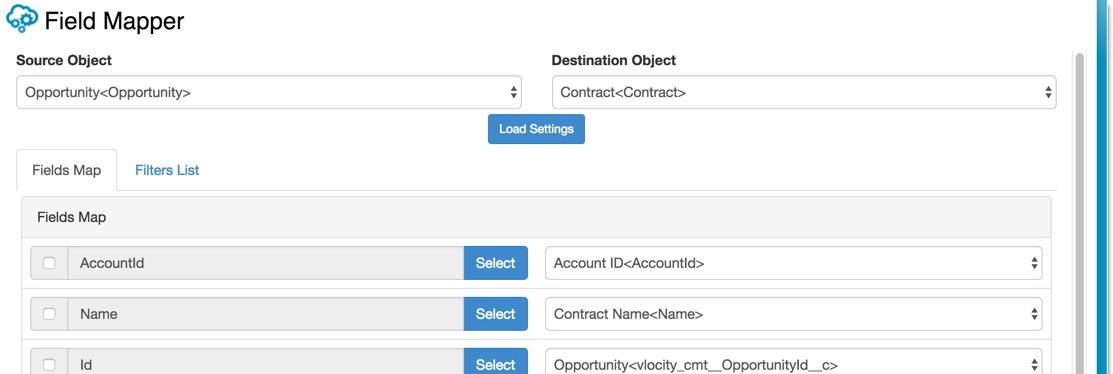
- From the Source Object list, select Opportunity<Opportunity>.
- From the Destination Object list, select Contract <Contract>.
-
Click Load Settings.
Fields on the left are fields in the source object—Opportunity. Fields on the right are fields in the destination object—Contract. The specific fields you see depends on how your org is set up.
To map a field from the Opportunity to the Contract, you must select the fields to map from the list on the left and select the field from the Contract on the right.
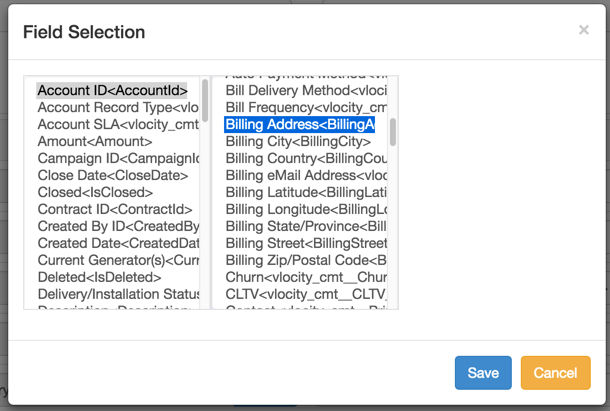
- Each object may contain child objects, which also contain fields. To see source object children and their fields, click Select.
- Select the field. If more child object fields exist, they appear in another list. You can select another field. Again, if more child object fields exist, they appear in a third list. Select the appropriate fields.
- When you are done mapping fields, click Save.