You are here:
Set Up Named Credentials
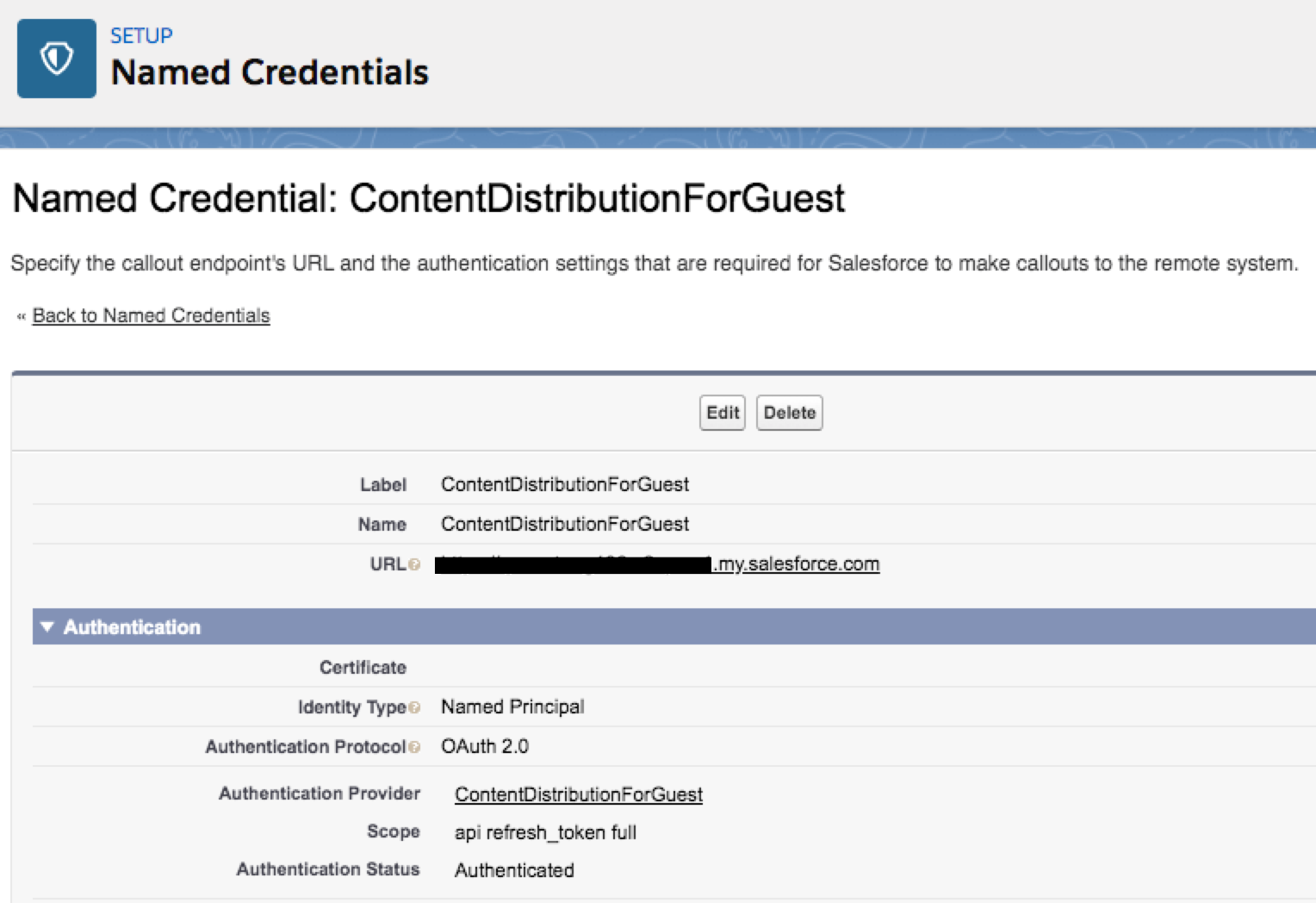
Complete the following procedure to set up named credentials for the connected app. Vlocity uses the named credential to create the content distribution record and respective URL to download the document.
This means that the user, such as an admin, who configures these named credentials sees a login screen and must log in as the appropriate user who is creating the content delivery.
- In Setup, in the Quick Find box, enter Security.
- Click Named Credentials.
- Click New Named Credential.
-
In the Label field, enter the name.For example, ContentDistributionsForGuest.
 Important
You must use this name in the Setup Value field for the custom setting in the following procedure.
- In the Name field, use the same name.
-
In the URL field, provide the host URL.
Important
You must use my.salesforce.com in the URL and not use lightning.force.com. For example, use https://vlocity.my.salesforce.com.
- Keep the Certificate field blank.
- In the Identity Type field, select Named Principal.
- In the Authentication Protocol field, select OAuth 2.0.
- In the Authentication Provider, select the Auth. provider that you just created.
- Select Start Authentication Flow on Save.
- Keep all the other fields with the default settings.
- Click Save.
- At the login screen, log in as the authenticated user who manages the guest users.