
You are here:
Map Geolocation Dimensions
If your data stream contains geolocation information, you can use the different geolocation dimensions when mapping.
Required Editions
| User Permissions Needed | |
|---|---|
| To map geolocation dimensions: | Admin |
- On the Connect & Mix tab, select Data Streams and then Data Streams List.
- Create a data stream or edit one.
-
To enter the Mapping page, click Map to
Model. All geolocation dimensions are located under Dimensions.
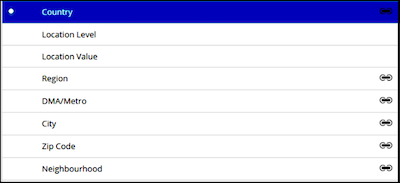
The types of geolocation dimensions differ from country to country because each country has its own way of gathering geographical data. These geolocation dimensions can be mapped:
Country A dimension that must be mapped as a predefined field. You can then map any other additional granularity that you want, such as region, city, ZIP code, and so on. Location Level No longer needed. Location Value No longer needed. Region Differs by country. For example, states in the US, provinces in Canada, and so on. DMA/Metro Not available for all countries. City Differs by country. Zip Code Not valid for all countries. Neighborhood Not valid for all countries. Each dimension has its own properties as well. Some are hard-coded, while others can be edited manually. To view a dimension’s properties, select the dimension, and then on the right-hand side of the page, expand the Default Value dropdown list to view the options. For example, here are the attributes of Country.
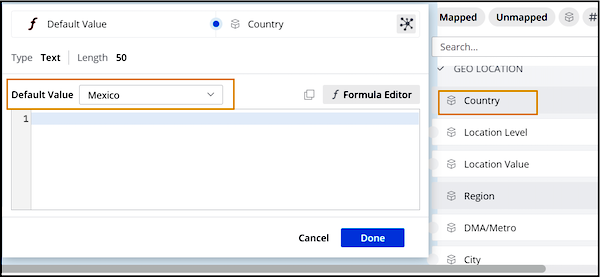
 Note Make sure that you always map at the most granular level. For example, if both country and city are present in the uploaded data, map both of them.
Løste denne artikel dit problem?
Giv os besked, så vi kan forbedre os!
