
You are here:
Slowly Changing Dimensions Type 2
With CRM data, opportunity or lead attributes are updated over time because an opportunity can go through different stages. The CRM leads data stream type uses the slowly changing dimensions type 2 method to enable a data display suitable for these changes in dimension values. After a dimension’s value changes, the new value appears from the modification date and onwards. The value isn’t updated retroactively.
After a dimension’s value changes, the new value appears from the modification date and onwards. The value isn’t updated retroactively.
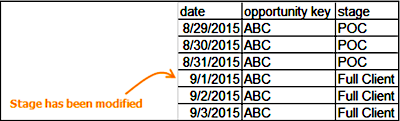
The CRM data stream type includes four dimensions that work according to the slowly changing dimensions type 2 method:
- Status
- Stage
- Modified Date
- Expected Close Date
For the platform to display the data properly, you must map two crucial dimensions:
- Modified Date - This field is mandatory. It serves as the only date-type field in this data stream type. The lead modified date is the date on which the other type 2 dimensions lead stage, and lead status, changed.
- Opportunity Status – This field has a closed list of values. The Opportunity Status field
must be mapped and contain one of these values. If the Opportunity Status isn’t mapped or it’s
mapped incorrectly, it can cause discrepancies in your data. The platform refers to any value
that isn’t one of the values, as CLOSED.
- OPEN – The opportunity is ongoing.
- CLOSED – The opportunity is resolved. After an opportunity is classified as CLOSED it doesn’t appear in dates past its last modified date.
- DELETED – The opportunity isn’t relevant, the platform doesn’t display any appearances of
the opportunity in the data. Because data from different platforms can contain different
values, use a formula to map the Opportunity Status Dimension, for example:
- IF(csv['status'] contains 'Open', 'OPEN', 'CLOSED')
Or if you’re extracting the Opportunity Status from the Stage field:
- IF(csv['stage'] contains 'Closed', 'CLOSED', 'OPEN')
