Get a Complete View of the Marketing Schedule in Marketing Planning and Operations
See your whole marketing plan on a page. Marketing leaders and managers can see when work
runs across the hierarchy, in a timeline view and a calendar view that the Marketing Calendar
powers. You can open it on marketing programs, on campaigns, and on the home page of the Marketing
Planning & Operations app.
The timeline view always appears, but the calendar view appears only when you have access to
the Marketing Calendar. Both views leave out programs and campaigns without start and end dates.
Timeline View
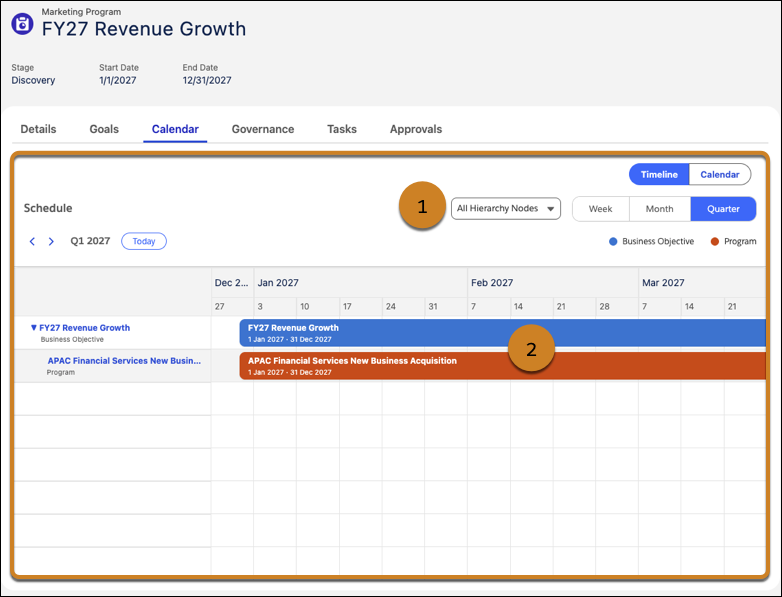
In the timeline view, these numbered callouts map to the actions you can take:
Callout
Available Actions
1
Filter what you want to view by:
The node in the program's marketing hierarchy
The type of campaign
2
Click an item on the timeline to view its details.
For marketing programs,
you can:
Edit its details, such as name and stage
View existing goals and add new ones
Calendar View
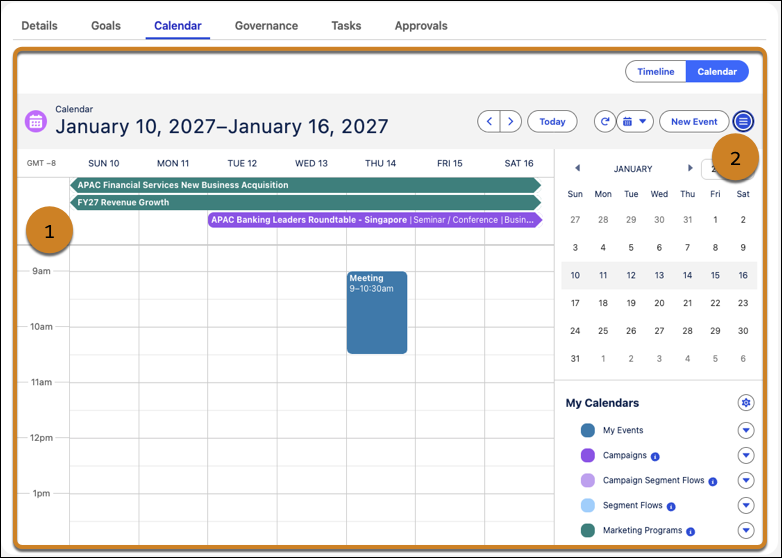
Unlike the timeline view, which shows only programs and campaigns, the calendar view shows
all of your marketing work, such as events and flows.
In the calendar view, these numbered callouts map to the actions you can take:
Callout
Available Actions
1
Click an item on the calendar to view its details.
2
Manage and filter the calendar's view, and add events to the calendar.
What You See on Each Calendar
The calendar shows different items depending on where you open it.
On a marketing program, it shows the program, its child programs, and their associated
campaigns.
On a marketing campaign, it shows the campaign and its child campaigns, and offers the
timeline view only.
On the home page of the Marketing Planning & Operations app, it shows all your
programs and their campaigns.
We use three kinds of cookies on our websites: required, functional, and advertising. You can choose whether functional and advertising cookies apply. Click on the different cookie categories to find out more about each category and to change the default settings.
Privacy Statement
Required Cookies
Always Active
Required cookies are necessary for basic website functionality. Some examples include: session cookies needed to transmit the website, authentication cookies, and security cookies.
Functional Cookies
Functional cookies enhance functions, performance, and services on the website. Some examples include: cookies used to analyze site traffic, cookies used for market research, and cookies used to display advertising that is not directed to a particular individual.
Advertising Cookies
Advertising cookies track activity across websites in order to understand a viewer’s interests, and direct them specific marketing. Some examples include: cookies used for remarketing, or interest-based advertising.