You are here:
Configure Profile Data Graph for the Maximize Revenue with Email Content Recommender
To use the Maximize Revenue with Email Content recommender, make sure that you include these related objects and fields to capture product purchase, email engagement, and personalization data.
Before configuring the profile data graph, create a N:1 (ManyToOne) active relationship between the Product Order Engagement ID field on Sales Order Product Engagement and the Product Order Engagement ID field on Product Order Engagement.
To create a profile data graph, use the instructions in Create a Data Graph, but select the fields and objects listed here.
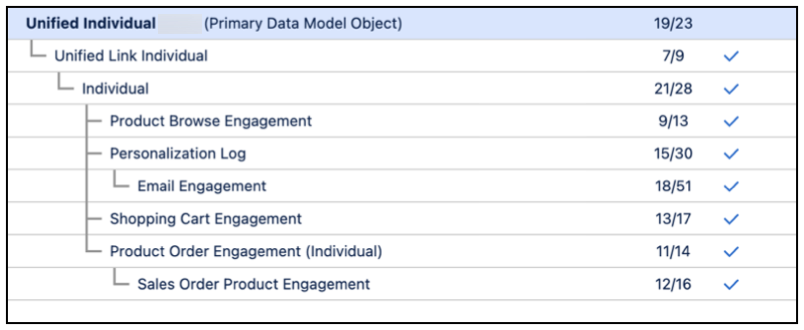
- Select Unified Link Individual, and click + to add it.
- Select Individual, and click +.
- Add Product Browse Engagement, Product Order Engagement, Shopping Cart Engagement, and Personalization Log to the data graph.
- Next to Product Order Engagement, click + and select Sales Order Product Engagement.
- Next to Personalization Log, click + and select Email Engagement.
-
Select these related objects, and add the required fields.
 Note Some fields are preselected for some objects. Leave those fields selected.
Related Object Field Name Field API Name Product Browse Engagement Created Date CreatedDate__cProduct ID ProductId__cProduct Brand ProductBrand__cProduct Category Name ProductCategoryName__cEngagement Channel Action EngagementChannelAction__cProduct Order Engagement Created Date CreatedDate__cIndividual ID IndividualId__cSales Order Product Engagement Created Date CreatedDate__cProduct Product__cOrdered Quantity OrderedQuantity__cProduct Price Amount ProductPriceAmount__cShopping Cart Engagement Created Date CreatedDate__cProduct Product__cProduct Brand ProductBrand__cProduct Category Name ProductCategoryName__cPersonalization Log Content Object Record ID ssot__ContentObjectRecordId__cEmail Engagement Bulk Email Message ID ssot__BulkMessageId__cEngagement Channel ID ssot__EngagementChannelId__cEngagement Channel Action ID ssot__EngagementChannelActionId__cEngagement Date Time ssot__EngagementDateTm__cFlow Element Run ID ssot__FlowElementRunId__cIndividual ID ssot__IndividualId__cPersonalization Request ID ssot__PersonalizationRequestId__cRecipient Message ID ssot__RecipientMessageId__cHere's a sample profile data graph:
- Add the direct or related attributes that you want to use for decision targeting or recommendation filters.
- Add the Data 360 segments or insights that you want to use when making targeting decisions.
- To review the structure of the JSON blob, click Preview.
- Save and build the data graph.
Did this article solve your issue?
Let us know so we can improve!
