
Allow customers to view several options for saving credit card details when they reach
the end of your force.com checkout page. They can save their credit card information as a token
and use it for fast payments in the Payment Center. They can also enable automatic payments so
that Salesforce Billing uses the token to charge their credit card upon invoice due
dates. (Salesforce Billing Managed Package)
Required Editions
Available in: Salesforce Billing Winter ’19 and later
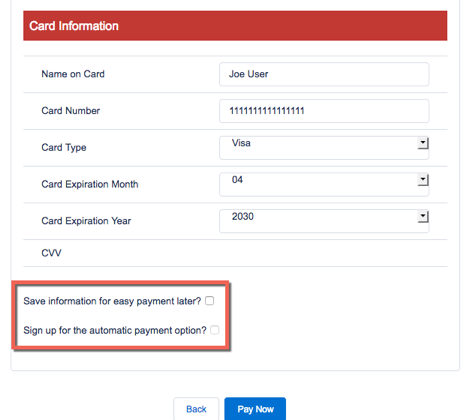
After you enable credit card saving, Salesforce Billing shows two settings at the end of the
Enter Credit Card Details page in your org’s checkout page. Customers can select these settings
as needed.
Save information for easy payment later?
Salesforce Billing saves as a token the credit card data that the customer entered on the
force.com page. The token generates after the customer clicks Pay
Now.
Customers can use that credit card to pay balances in the payment center without
re-entering credit card details.
Sign up for the automatic payment option?
Customers can select this option only if they also selected Save information
for easy payment later?
Whenever the customer’s invoice reaches its due date, Salesforce Billing automatically
uses their credit card to pay the invoice balance.
From Setup, in the Quick Find box, enter Installed Packages, and
then select Installed Packages.
Find the Salesforce Billing package and click Configure.
Click the Payment tab.
Select Save credit card details.
Salesforce Billing adds credit card detail options to the Enter Credit Card Details
page.
Löste denna artikel ditt problem?
Berätta för oss vad vi kan förbättra!
Laddar
Salesforce Help | Article
Cookie Consent Manager
General Information
Required Cookies
Functional Cookies
Advertising Cookies
General Information
We use three kinds of cookies on our websites: required, functional, and advertising. You can choose whether functional and advertising cookies apply. Click on the different cookie categories to find out more about each category and to change the default settings.
Privacy Statement
Required Cookies
Always Active
Required cookies are necessary for basic website functionality. Some examples include: session cookies needed to transmit the website, authentication cookies, and security cookies.
Functional Cookies
Functional cookies enhance functions, performance, and services on the website. Some examples include: cookies used to analyze site traffic, cookies used for market research, and cookies used to display advertising that is not directed to a particular individual.
Advertising Cookies
Advertising cookies track activity across websites in order to understand a viewer’s interests, and direct them specific marketing. Some examples include: cookies used for remarketing, or interest-based advertising.