You are here:
Monitor Momentum User Connectivity
Monitor the user connections from their connected activity provider accounts to Momentum.
Status & Metrics only includes data about the account connection to the activity platform, calendar sync, and email capture. Video call connection and recording metrics aren’t available. To monitor the number of available licenses, use the Momentum settings in Salesforce Go.

- From Setup, in Quick Find, enter and select Einstein Activity Capture.
-
Select Status & Metrics.
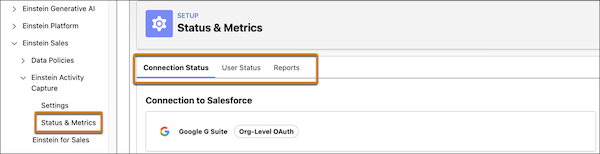
- Go to the different tabs to monitor the connection and create reports.
The Connection Status tab shows which Momentum users are active or need attention and the last data capture date and time.
User Status shows information about each Momentum user’s account connection. If a user’s Connected Account Status is Needs Attention, you see details about the issue and ways to fix it. The default view shows a maximum of 500 Momentum users who are a part of a configuration. To refine your results, search for a user or filter by status. The Synced Today metrics are updated after 12:00 AM local time.
The Reports tab helps you monitor event and email sync times and statuses for the last 7 days. View event and email failure sync reports to understand the reason for the failure and determine next steps to resolve them. Admins can use these reports to self-diagnose and identify potential issues in setup or configuration.
The daily event sync time reports exclude no-operations events. No-operations events are non-meaningful changes that don't result in an actual update to the event in Salesforce. By excluding no-operations events, event sync times reflect only meaningful events. Salesforce admins can accurately assess whether the system processes significant events within published performance times.

