You are here:
Delete a Unit from a Published Module
You can delete a unit from a published module.
Required Editions
| Available in: Enterprise, Performance, and Unlimited Editions |
| User Roles and Permissions | |
|---|---|
| Enablement Site User Roles | |
| This topic supports these enablement site roles: | Content Creators |
| Required System Permissions | |
| To create and edit content with Trailmaker Content: | Create Content |
-
Find the backpack that you want to import. You can:
- Access the backpack in your company’s version control system (VCS).
- Download the latest released version of the backpack from Trailmaker Release. To learn more, see Download a Backpack from Trailmaker Release.
- Import the backpack into your Trailmaker Content workspace.
-
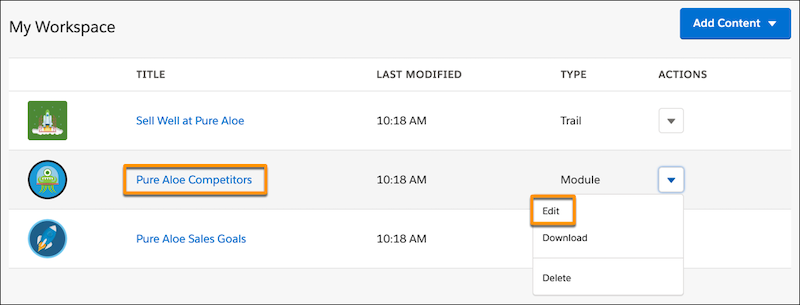
In the Trailmaker Content workspace, click the module title (1). Or, select
Edit from the Actions menu for the module (2).
-
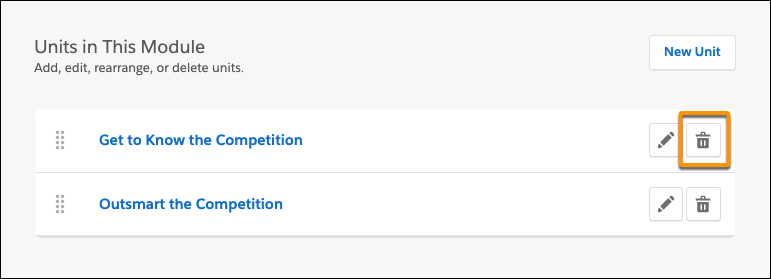
On the module page, click the delete icon
 for the unit that you want to
delete.
- To confirm the deletion, click Delete.
- Add the revised module to an unpublished release by completing the steps in Add Content to a Release from Trailmaker Content.
- Preview and publish the release.
- Download the latest released version of the module backpack, and store it in your VCS.
Konnten Sie Ihr Problem mithilfe dieses Artikels lösen?
Geben Sie uns Feedback, damit wir uns verbessern können.
