Get AI-Generated Deal Insights in Pipeline Inspection
Quickly catch up on deal activity and identify blockers without searching through emails or call transcripts. Use AI to get instant deal overviews, summarize recent meetings, and prepare for follow-up actions using suggested buttons or specific questions.
Required Editions
Available in: Lightning Experience
Available in: Enterprise, Performance, Unlimited, and
Developer Editions with the Agentforce for Sales or Agentforce for an
Industry add-on, or included in Agentforce 1 Sales or an Industry Edition. Requires
each user to have the Agentforce for Sales or Agentforce for an Industry add-on to
access the actions.
User Permissions
Needed
To use AI deal insights:
Agentforce Account Management
Key Deal Insights
To get deal insights, open the side panel and click
any of these insights.
Deal Summary: Get a comprehensive overview of the deal, including customer goals, pain
points, and key players.
Last Interaction: Summarize key takeaways, customer sentiment, and important points from
your most recent meeting or conversation.
Deal Strategy: Identify potential blockers, objections, or negative shifts in sentiment
that could impact the deal.
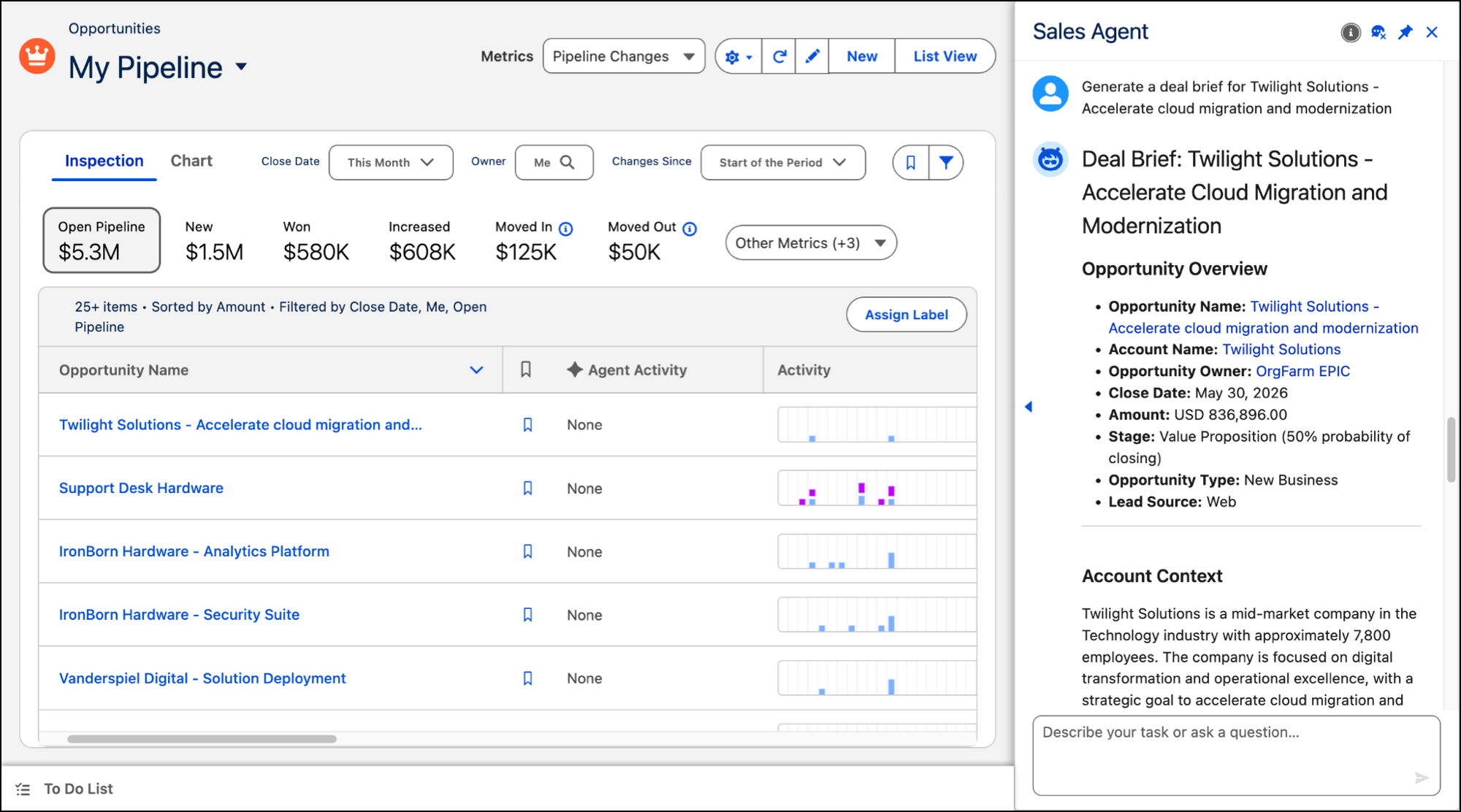
This image shows the Sales Agent panel generating a deal summary when you click Deal
Summary in the Pipeline Inspection side panel.
Review the AI-generated response in the
Sales Agent panel. The responses are synthesized from your opportunity data, call
transcripts, and email history to provide grounded, relevant answers.
We use three kinds of cookies on our websites: required, functional, and advertising. You can choose whether functional and advertising cookies apply. Click on the different cookie categories to find out more about each category and to change the default settings.
Privacy Statement
Required Cookies
Always Active
Required cookies are necessary for basic website functionality. Some examples include: session cookies needed to transmit the website, authentication cookies, and security cookies.
Functional Cookies
Functional cookies enhance functions, performance, and services on the website. Some examples include: cookies used to analyze site traffic, cookies used for market research, and cookies used to display advertising that is not directed to a particular individual.
Advertising Cookies
Advertising cookies track activity across websites in order to understand a viewer’s interests, and direct them specific marketing. Some examples include: cookies used for remarketing, or interest-based advertising.