詳細情報:
ルート最適化の状況を追跡する
マネージャーは、Maps Advanced ルートテンプレートユーザーオブジェクトを使用して、担当者のルート最適化の進捗を監視します。Salesforce Maps Advanced で担当者の経路が最後に最適化された時間を確認し、エラーを特定します。
この記事で問題は解決されましたか?
ご意見をお待ちしております。
マネージャーは、Maps Advanced ルートテンプレートユーザーオブジェクトを使用して、担当者のルート最適化の進捗を監視します。Salesforce Maps Advanced で担当者の経路が最後に最適化された時間を確認し、エラーを特定します。
| サポートされているエディションを表示する。 |
| 必要なユーザー権限 | |
|---|---|
| 設定をカスタマイズする | 「アプリケーションのカスタマイズ」 |
Maps Advanced ルートテンプレートユーザーオブジェクトからは、レポートやリストビューを作成できます。以下のおおまかな手順を使用して、処理中のすべてのユーザーのルート最適化に関する一元的なビューを作成します。
エラーをトラブルシューティングする場合は、デバッグログを使用します。アプリケーションランチャーから、[Maps デバッグログ] を見つけて選択します。たとえば、次のデバッグログは、担当者がカレンダービューで見た最適化エラーを示しています。
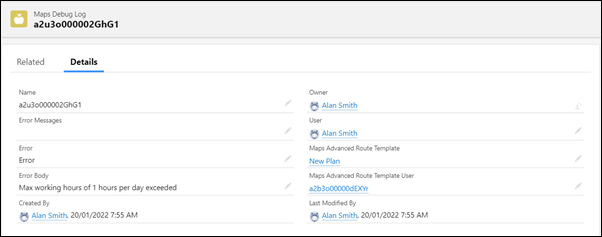
Maps デバッグログオブジェクトを基に、レポートやリストビューを作成できます。

We use three kinds of cookies on our websites: required, functional, and advertising. You can choose whether functional and advertising cookies apply. Click on the different cookie categories to find out more about each category and to change the default settings.
Privacy Statement
Required cookies are necessary for basic website functionality. Some examples include: session cookies needed to transmit the website, authentication cookies, and security cookies.
Functional cookies enhance functions, performance, and services on the website. Some examples include: cookies used to analyze site traffic, cookies used for market research, and cookies used to display advertising that is not directed to a particular individual.
Advertising cookies track activity across websites in order to understand a viewer’s interests, and direct them specific marketing. Some examples include: cookies used for remarketing, or interest-based advertising.