您位於此處:
月份
在 Salesforce Spiff 中傳回指定日期或時間的行事曆月份編號。
必要版本
| 提供版本:Salesforce Classic (並非所有組織皆適用) 和 Lightning Experience |
| 提供版本:Enterprise、Unlimited 及 Developer Edition |
| 下列版本亦可額外付費使用:已啟用 Web 服務 API 的 Professional Edition |
語法
month(date_or_time)引數
| 引數 | 是否必要? | 描述 |
|---|---|---|
| date_or_time | 必要 | 要評估的「日期」或「日期與時間」值。此引數支援任何日期函數。 |
範例
傳回 2024 年 7 月 21 日的行事曆月份編號。傳回值為 7。
=month("2024-07-21")根據 CloseDate 傳回行事曆日數。
=month(CloseDate)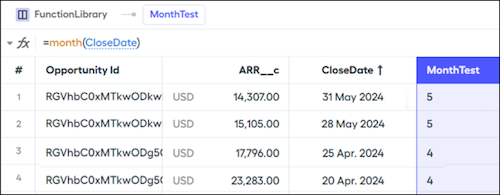
在另一個範例中,您可能想要建立對帳單計算,以在週期為偶數月份時傳回 true。
=month(statement_period.start_date) = 2 OR
month(statement_period.start_date) = 4 OR
month(statement_period.start_date) = 6 OR
month(statement_period.start_date) = 8 OR
month(statement_period.start_date) = 10 OR
month(statement_period.start_date) = 12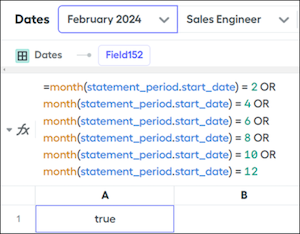
若要簡化此公式,請新增 mod() 函數,其可決定 month() 函數的結果是否可除以 2。
=mod(month(statement_period.start_date), 2) = 0此文章是否解決您的問題?
請讓我們知道,以便我們改進!
