You are here:
Let Users View Help Agents
To let a user access the Help Agents tab, view agent details, and open related links, assign the View Help Agents permission set. To view resolution analytics, also assign the Data Cloud User permission set.
- In the Build and Manage Your Agents section of the Help Agent Salesforce Go page, click Manage for the Let Users View Help Agents option.
-
To assign a View Help Agents permission set:
-
Open the View Help Agents tab.
This tab shows a list of users to whom you can assign the permission set.
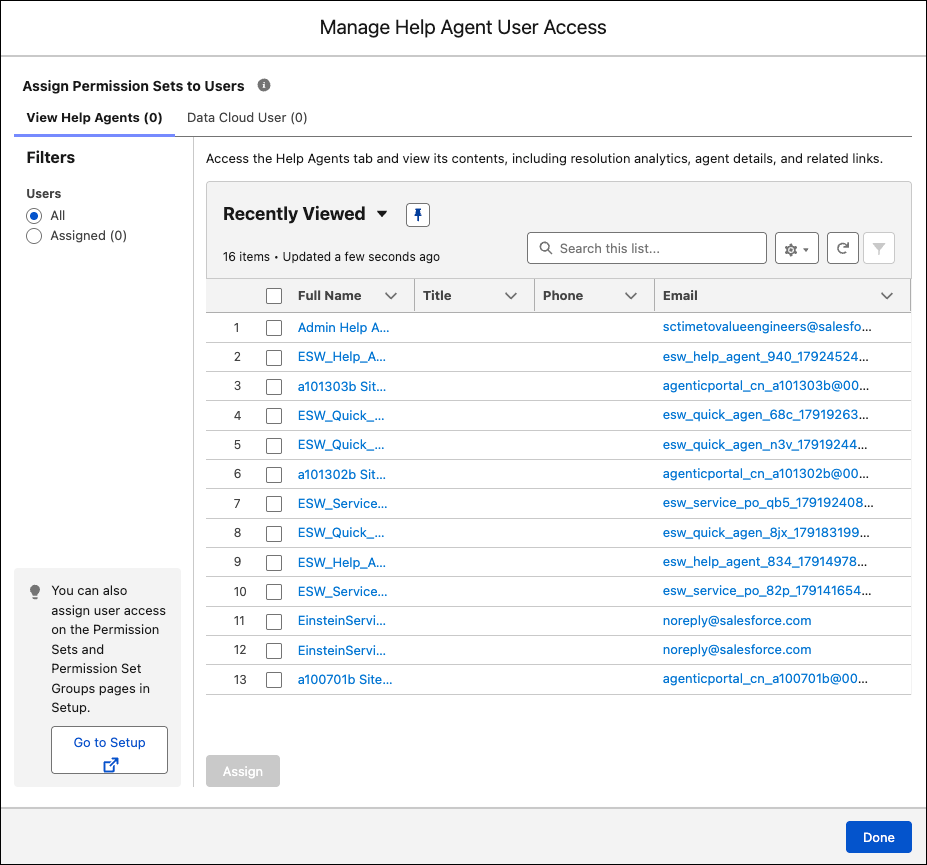
- Select one or more users, and then click Assign.
-
Click Done.
The View Help Agents permission set is assigned to the selected users.
-
Open the View Help Agents tab.
-
To assign the Data Cloud User permission set:
-
Open the Data Cloud User tab.
This tab shows a list of users to whom you can assign the permission set.
- Select one or more users, and then click Assign.
-
Click Done.
The Data Cloud User permission set is assigned to the selected users.
-
Open the Data Cloud User tab.
Did this article solve your issue?
Let us know so we can improve!
