
You are here:
Automate IT Work Assignment with Assignment Rules and Omnichannel Routing
Know how a new incident for an IT issue is routed to the right support agent by using a combination of assignment rules and omnichannel routing.
Required Editions
| Available in: Lightning Experience |
| Available in: Unlimited and Enterprise editions with Agentforce IT Service. |
Scenario
Jane, an employee at Cumulus Bank, submits a new incident report about a VPN connection issue through the Agentforce Employee portal. This incident needs to be routed to a support rep on the Network Support team who is available and has the necessary skills to resolve the issue.
Workflow
- Record Creation: Jane creates a new incident record in the Agentforce Employee portal.
- Assignment Rule Triggered: As soon as the record is created, the assignment rule is triggered.
- Rule Evaluation: The assignment rule checks the incident's attributes. It finds a match based on the category being Network and the subcategory being VPN.
- Assignment to Queue: The assignment rule automatically routes the incident to the Network Support queue.
- Omnichannel Routing: Omnichannel takes over the routing process and assigns the incident to
the most qualified and available support rep who is best-fit for the work item. To make an
intelligent assignment, Salesforce automatically evaluates the waiting work items in the queue
against several factors:
- Availability: Salesforce checks which support reps are online and available to accept new work.
- Capacity: Salesforce considers the support rep's current workload to ensure they aren't overloaded.
- Skills-Based Routing: The incident's attributes are matched with the skills of the support reps to ensure the work is assigned to the rep with the right expertise.
- Best-Fit Selection: Among the qualified agents, Omnichannel uses the defined routing model (such as Most Available or Least Active) to pick the final assignee. In this case, even though both Jake and John are qualified, the Least Active routing model assigns the incident to John because he has a lower current workload.
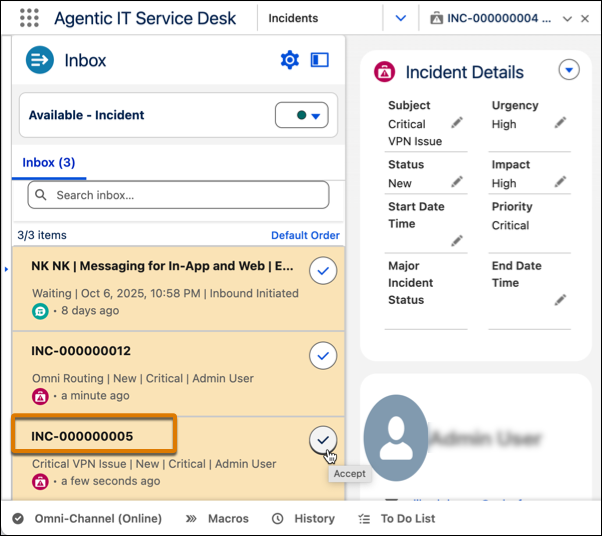
- Work Assigned: John gets the request in his Omnichannel utility bar. He accepts it and begins working on the issue.
- Assign with Einstein: If he thinks he has been wrongly assigned the issue, he can also use Assign with Einstein to assign the record to someone else. Einstein uses incident details and other insights from other incidents to route issues to the most suitable fulfiller.
이 기사를 통해 문제를 해결했습니까?
개선을 위한 의견을 보내주세요.
