Overvåg, opdater og slet Service Intelligence-apps
Brug fanen Appadministration til at overvåge status for installationsanmodninger, se logfiler for at fejlfinde installationsproblemer, spore appanvendelsesstatistikker og opdatere og slette apps.
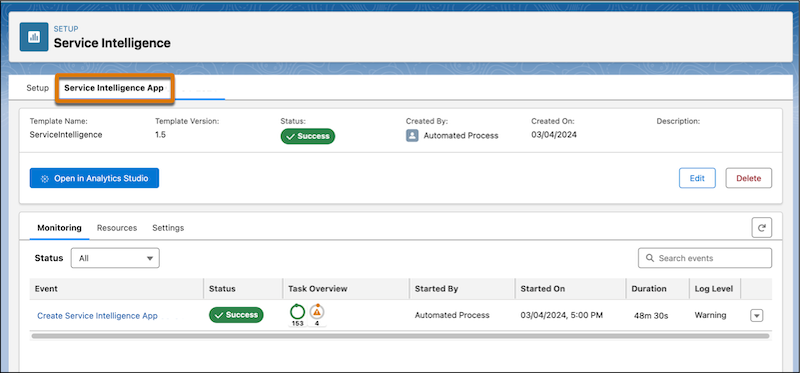
Fra menuen Opsætning vises installerede versioner af Service Intelligence som separate faner. Hvis du vil se detaljer om hver appinstallation, skal du vælge en appfane. Appdetaljerne inkluderer installationsstatussen, en liste over installationsbegivenheder og opgaverne for hver begivenhed. Du kan planlægge appopdateringer eller opdateringer manuelt og se detaljer for alle installerede apperessourcer som dashboards og datatransformationer. Hvis du ønsker flere oplysninger om appstyring, kan du se Administrer dine intelligente apps.
Løste denne artikel dit problem?
Giv os besked, så vi kan forbedre os!
Indlæser
Salesforce Help | Article
Cookie Consent Manager
Cookie Consent Manager
General Information
Required Cookies
Functional Cookies
Advertising Cookies
General Information
We use three kinds of cookies on our websites: required, functional, and advertising. You can choose whether functional and advertising cookies apply. Click on the different cookie categories to find out more about each category and to change the default settings.
Privacy Statement
Required Cookies
Always Active
Required cookies are necessary for basic website functionality. Some examples include: session cookies needed to transmit the website, authentication cookies, and security cookies.
Functional Cookies
Functional cookies enhance functions, performance, and services on the website. Some examples include: cookies used to analyze site traffic, cookies used for market research, and cookies used to display advertising that is not directed to a particular individual.
Advertising Cookies
Advertising cookies track activity across websites in order to understand a viewer’s interests, and direct them specific marketing. Some examples include: cookies used for remarketing, or interest-based advertising.