You are here:
Status Indicator Behavior for Dynamic Plans
Review when the Service Assistant component shows status indicators that let service reps know Service Assistant is active.
Required Editions
 This article applies to: |
Service Assistant for Case, Messaging, and Voice with dynamic plans |
- Case Status Indicators
- Case Status Indicator Limitations
- Messaging and Voice Status Indicators
- Messaging and Voice Status Indicator Limitations
Case Status Indicators
The status indicator “Service Assistant is working on it…” lets service reps know that Service Assistant is active, processing the record details, and generating the service plan. The status indicator shows automatically when a rep opens a case record that meets your eligibility criteria to indicate that Service Assistant is generating the plan summary. The status indicator is on by default when you turn on Service Assistant for Case from the Service Assistant Setup page.
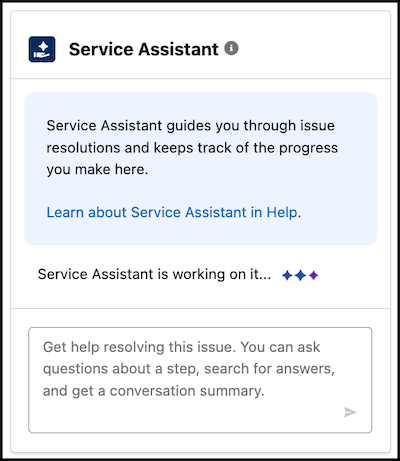
Reps also see “Service Assistant is working on it…” when they:
- Click Start Plan.
- Complete a step and Service Assistant generates the next step.
- Confirm an action.
- Enter a request in the agent chat and wait for a response, such as a request to look up knowledge or run an action.
Case Status Indicator Limitations
In some scenarios, the status indicator for case doesn’t show, or its presence is limited. Share this information with your reps so they know what to expect. Each scenario includes a demo that shows what reps see when they work a dynamic plan for a case.
Scenario: Ineligible Record
When a rep opens a record that doesn’t meet your eligibility criteria, the rep sees an ineligibility error message instead of the status indicator. If the record is later updated to become eligible, the status indicator still doesn’t show. Ineligible record demo video.
Scenario: A Capability Card Appears Before the Plan Summary
When a capability card, such as Case Catch-Up & Insights, appears before the plan summary shows, the indicator disappears as soon as the card appears. The plan summary continues to generate, but no indicator shows while it does. Capability card demo video.
Scenario: Service Assistant Regenerates the Current Step
When new case information arrives, Service Assistant regenerates the current step. The updated step shows automatically, with no indicator that Service Assistant is processing the new information and creating a new plan step. New case information includes a new email, a grounding field update, or a new or edited comment. Which updates regenerate the step depends on your Update Plan Context settings. Case data update demo video.
Messaging and Voice Status Indicators
In Service Assistant for Messaging and Voice, the status indicators let service reps know that Service Assistant is active and processing the chat messages and call transcript. The status indicators are on by default when you turn on Service Assistant for Messaging or Service Assistant for Voice from the respective object tab of the Service Assistant Setup page.
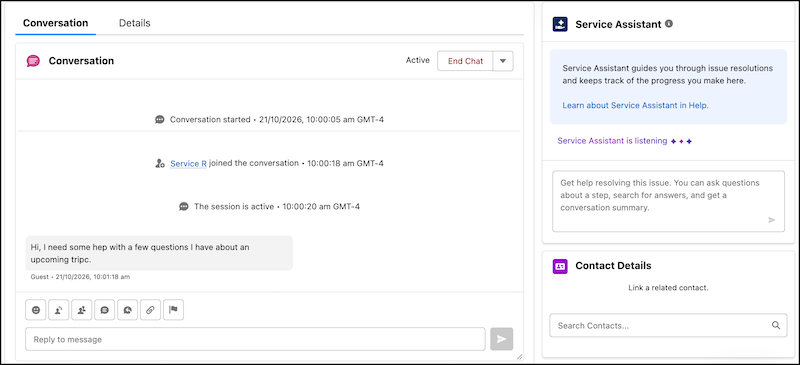
“Service Assistant is listening…” shows when a rep accepts a messaging session or voice call and the record page opens. The indicator lets service reps know that Service Assistant is monitoring the chat messages or call transcript to detect the issue and initiate the plan.
After Service Assistant identifies the issue, service reps see “Service Assistant is working on it…” while the service plan generates.
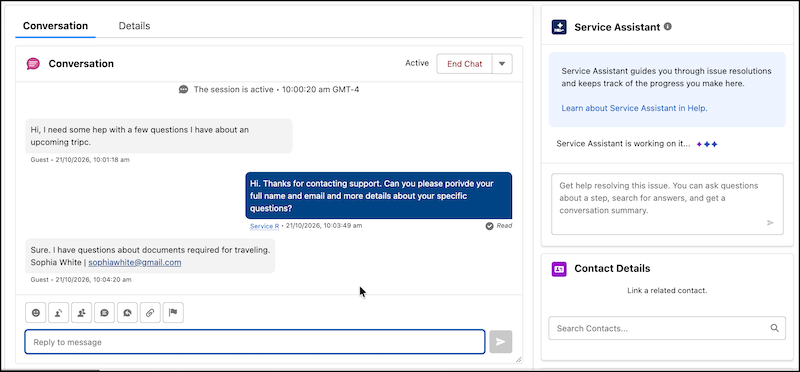
In Service Assistant for Messaging and Voice, reps also see “Service Assistant is working on it…” when:
- They click Start Plan for a messaging plan. The button shows only when Start Plans Automatically isn’t turned on.
- They complete a step and Service Assistant generates the next step.
- They confirm an action, or an action runs automatically.
- They send a message in the agent chat and wait for a response, such as a request to look up knowledge or run an action.
- Service Assistant detects new information in the chat or call and then automatically starts to generate a new step.
Messaging and Voice Status Indicator Limitations
In some scenarios, the status indicators for messaging and voice don’t show, or their presence is limited. Share this information with your reps so they know what to expect.
Scenario: Ineligible Record
When a rep accepts a messaging session or voice call that doesn’t meet your eligibility criteria, the rep sees no error message. Instead, the “Service Assistant is listening…” indicator keeps showing, even after the customer states an issue in the chat messages or call transcript. This persistence means that the record didn’t pass the eligibility check, or that the flow has a processing error or times out. The plan won’t start, and service reps must ask the Salesforce admin for help troubleshooting. See Service Plan Eligibility Criteria.
Scenario: A Capability Card Appears Before Issue Detection
When a capability card, such as Service Replies, appears in the component, the “Service Assistant is listening…” indicator disappears as soon as the card appears. If the chat messages or call transcript don’t state a clear issue after the capability card generates, “Service Assistant is listening…” doesn’t show again. The component remains static with no status indicator until Service Assistant identifies the issue. When Service Assistant does identify the issue, service reps see “Service Assistant is working on it…” while the service plan generates.
Scenario: A Rep Enters a Message in the Agent Chat
When a rep enters an utterance in the agent chat while “Service Assistant is listening…” shows, such as asking for customer information or looking up knowledge, the listening indicator switches to “Service Assistant is working on it…” while Service Assistant processes the service rep’s request.
After Service Assistant completes the request, one of two scenarios occurs.
- If the chat or call transcript states an issue, service reps see “Service Assistant is working on it…” while the service plan generates.
- If Service Assistant hasn’t detected an issue, the component remains static with no status indicator until Service Assistant identifies the issue. Then service reps see “Service Assistant is working on it…”.
Scenario: The Context Changes
When the conversation context changes, no status indicator shows. For example, a customer states in one message that their issue is a refund, and later asks to change their shipping address. The component stays static, and the next plan step that addresses the new concern appears with no status indicator that Service Assistant is generating the new step.
