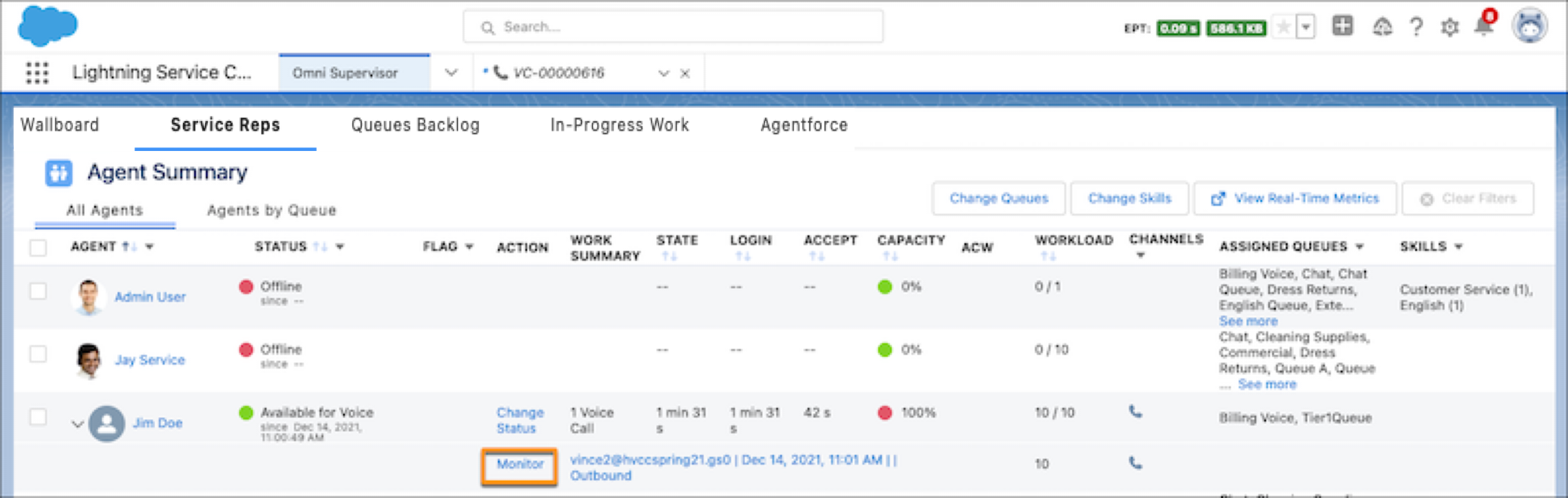
Om de gespreksafhandeling van een contactcentrum te verbeteren, kunnen supervisors luisteren naar elk lopend gesprek vanuit het Command Center for Service. Ze kunnen slechts naar één gesprek tegelijk luisteren. Wanneer een supervisor naar het gesprek luistert, wordt de vertegenwoordiger geïnformeerd in de chattranscriptie, maar de klant niet.
Vereiste editions
Dit artikel is van toepassing op:
Salesforce Voice met Amazon Connect
Salesforce Voice met partnertelefonie
Salesforce Voice met partnertelefonie van Amazon Connect
Salesforce Voice-contactcentrumvertegenwoordiger (partnertelefonie) OF Salesforce Voice-contactcentrumvertegenwoordiger
AND
Supervisor van Salesforce Voice-contactcentrum
AND
Salesforce Voice-contactcentrumbeheerder
Een supervisor van een contactcentrum is een gebruiker aan wie de machtigingenset Salesforce Voice Contact Center Supervisor is toegewezen in Salesforce. Contactcentrumsupervisors moeten weergavetoegang hebben tot alle exemplaren van de Voicecall-record voordat ze voicecalls kunnen beluisteren.
Als u supervisors van contactcentra spraakoproepen wilt laten afluisteren, configureert u hun beveiligingsprofiel in Amazon Connect.
Wijs dit beveiligingsprofiel toe aan de supervisor van het contactcentrum.
Open Command Center for Service.
Vouw vanuit het tabblad Servicevertegenwoordigers een gesprek uit en klik op Bewaken.
Klik voor het bewaken van een gesprek vanuit Amazon Connect op Luisteren op AWS. Klik voor het bewaken van een gesprek vanuit Command Center for Service op Listen In.
Er wordt slechts één van deze opties tegelijk weergegeven en welke optie beschikbaar is, is afhankelijk van de vraag of Gesprekken met meerdere partijen en Uitgebreide bewaking zijn ingeschakeld in Amazon Connect.
Laat ons weten wat we kunnen doen om te verbeteren!
Wordt geladen
Salesforce Help | Article
Cookie Consent Manager
Cookie Consent Manager
General Information
Required Cookies
Functional Cookies
Advertising Cookies
General Information
We use three kinds of cookies on our websites: required, functional, and advertising. You can choose whether functional and advertising cookies apply. Click on the different cookie categories to find out more about each category and to change the default settings.
Privacy Statement
Required Cookies
Always Active
Required cookies are necessary for basic website functionality. Some examples include: session cookies needed to transmit the website, authentication cookies, and security cookies.
Functional Cookies
Functional cookies enhance functions, performance, and services on the website. Some examples include: cookies used to analyze site traffic, cookies used for market research, and cookies used to display advertising that is not directed to a particular individual.
Advertising Cookies
Advertising cookies track activity across websites in order to understand a viewer’s interests, and direct them specific marketing. Some examples include: cookies used for remarketing, or interest-based advertising.