
You are here:
Install the Workplace Command Center and Wellness Check Packages
Use the Work.com installer to install and automatically complete some configuration for the Workplace Command Center managed package and the Wellness Check unmanaged package. Then, follow the prompts to complete the manual, post-installation setup steps.
Required Editions
| Available in: Lightning Experience |
| Available in: Enterprise and Unlimited Editions |
| Workplace Command Center is available as an add-on license. |
| User Permissions Needed | |
|---|---|
| To configure installed packages: | Customize Application |
Before installing the packages, complete the required org setup steps listed here: Configure General Settings for Workplace Command Center.

- 18.214.2.206
- 3.89.46.237
- 52.201.65.75
- 52.2.53.142
-
Navigate to this URL in your browser: https://install.work.com/
Note The Salesforce installer service is used only for the installation and initial configuration of the Workplace Command Center and Wellness Check packages.
- Click Operations and Safety then Workplace Command Center.
- Click Install and Configure Workplace Command Center.
- Click Log In to Start Pre-Install Validation.
- Select your org type. Enter your Salesforce username and password.
- Click Allow to run the pre-installation validation.
- In the Connected to Salesforce box, confirm that you’re logged in to the correct org. If the pre-install validation fails, use the error messages in the installer to troubleshoot and complete the pre-installation requirements in your org. When you’re ready, return to the installer URL and try again.
-
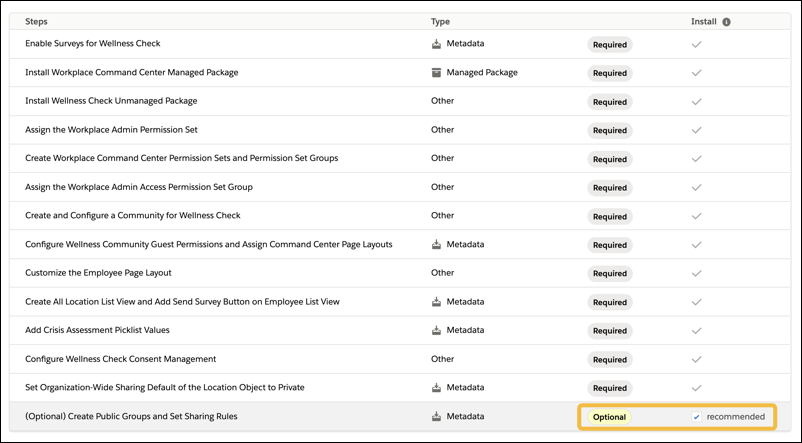
Review the list of customizations the installer makes in your org. Check the box in the
Install column to select (Optional) Create Public Groups and Set Sharing
Rules. If you decide not to include this step during installation, review
our considerations on setting up sharing
rules for Work.com personas before you set them up manually.
- Click Install. Click Confirm to accept the terms of use.
During installation, your user is assigned the Workplace Admin permissions that are needed to configure and manage the org.
After a successful installation, complete additional manual configuration as follows.
Create Workplace Operations and Workplace Operations Executive users and add them to their respective permission set groups. And configure Workplace Command Center and Wellness Check, then create and import data into your org.
Follow the prompts throughout the Salesforce Help topics to complete the post-installation configuration.
The Salesforce installer service is available in English, Japanese, French, German, Spanish, and Dutch.
