You are here:
Enable Learners to Access the Appointment Setup Flow
Configure sharing rules for learners to grant them the required read and write access to their service appointment records, and read access to their case records.
| Available in: Lightning Experience |
| Available in: Enterprise, Performance, Unlimited, and Developer Editions with Education Cloud |
| User Permissions Needed | |
|---|---|
| To enable learners to access appointments: | Education Cloud Full Access |
- From Setup, in the Quick Find box, enter Digital Experiences, and then select Settings.
- In the Sharing Sets section, click New.
- Enter a label and name, and if needed, a description. Salesforce shows the label on the user interface. The sharing set name is the unique name that the API uses.
- Add the profile that you created for the appointment Experience site.
- In the Select Objects section, add the Service Appointment object.
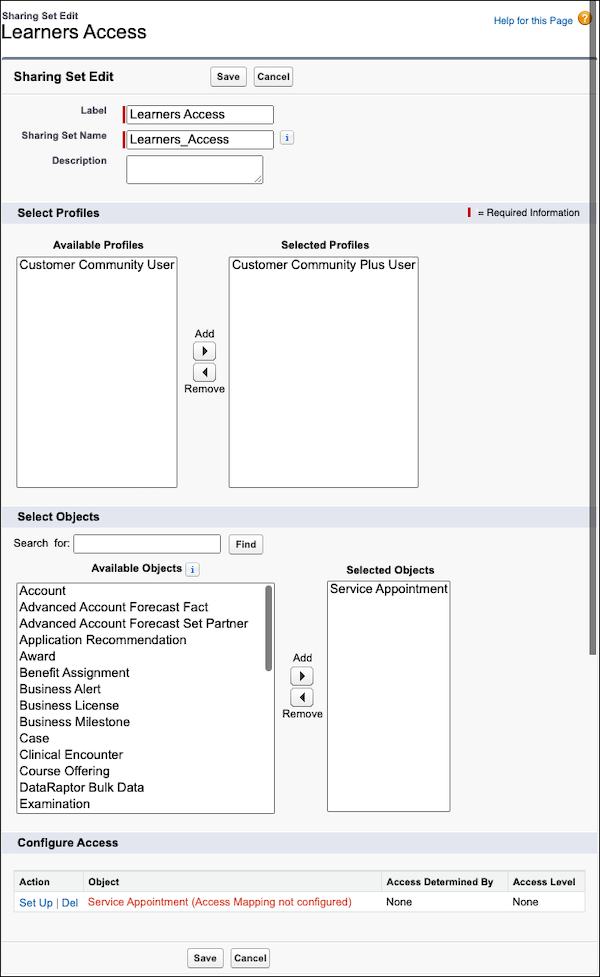
- In the Configure Access section, click Set Up.
- Select the Contact.Account user.
- Select the Account target.
- Select the Read/Write access level.
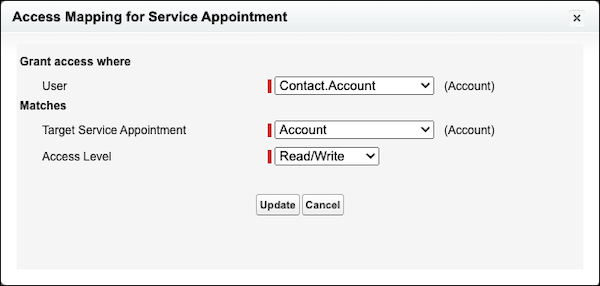
- Click Update.
- On the Sharing Set page, add the Case object.
- In the Configure Access section, click Set Up next to the Case object.
- Select the Contact user.
- Select the Account.PersonContact target.
- Select the Read Only access level.
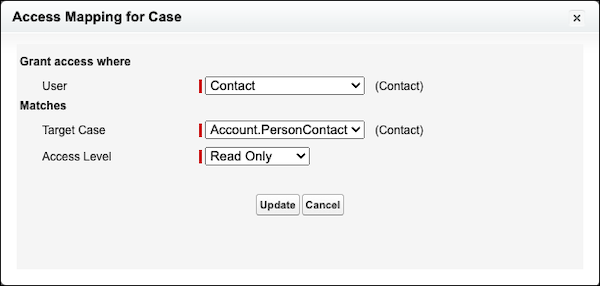
- Click Update.
- Save your changes.
Did this article solve your issue?
Let us know so we can improve!
