You are here:
PMM Enable Mass Program Engagement Creation
Mass creating Program Engagements for a Program reduces time and effort spent by your users.
- Enable Mass Creation of Program Engagements
Allow users to mass create Program Engagements for a single Program directly from a Contact list view.
Enable Mass Creation of Program Engagements
Allow users to mass create Program Engagements for a single Program directly from a Contact list view.
Click
 , then click Setup.
Click the Object Manager tab.
In the list of objects, click Contact.
Click List View Button Layout.
Next to the List View layout, click
 , then select Edit.
In the Available Quick Actions list, select Add Contact to Program, then click
 to move it to Selected Quick Actions.
Save your update.
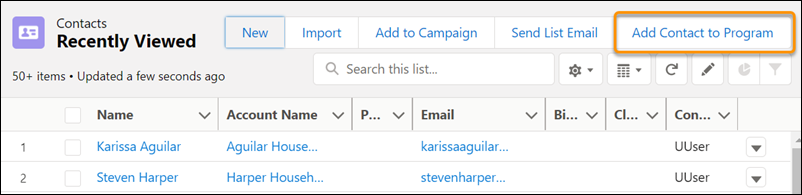
You can now mass create Program Engagements using the Add Contact to Program button.
この記事で問題は解決されましたか?
ご意見をお待ちしております。
