You are here:
Configure Data Access for Visualforce Pages
Volunteers for Salesforce is built on Visualforce, which is a way to create custom user interfaces for Salesforce objects and data. Configure access to Visualforce pages for your volunteers user profile.
- If you wandered away from your site to check on your Sharing Settings, go back to Sites from Setup.
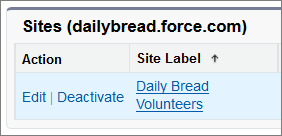
- Click the site label for your site.
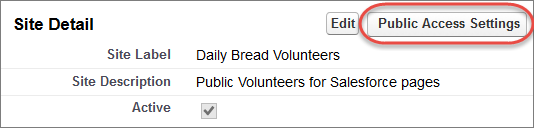
- On the Site Detail page, click Public Access Settings.
 Note The following steps assume you're using the Enhanced Profile User Interface. If you're using the Original Profile Interface, the path to these settings and the actions you take are slightly different.
- Click Visualforce Page Access, then click Edit.
- Add these pages to the Enabled Visualforce Page Access section.
Ctrl + click to select more than one page at a time.
- GW_Volunteers.JobCalendar
- GW_Volunteers.VolunteersJobListing
- GW_Volunteers.VolunteersJobListingFS
- GW_Volunteers.VolunteersReportHours
- GW_Volunteers.VolunteersSignup
- GW_Volunteers.VolunteersSignupFS
- If you intend to set up the Volunteers Personal Site feature,
also add these pages.
- GW_Volunteers.PersonalSiteContactInfo
- GW_Volunteers.PersonalSiteContactLookup
- GW_Volunteers.PersonalSiteJobCalendar
- GW_Volunteers.PersonalSiteJobListing
- GW_Volunteers.PersonalSiteReportHours
- GW_Volunteers.PersonalSiteTemplate
- Save your changes.
この記事で問題は解決されましたか?
ご意見をお待ちしております。
