
You are here:
Schedule Recurring Shifts using Job Recurrence Schedules
Job Recurrence Schedules provide an easy way to schedule multiple future Job shifts. You determine when and how often the shifts occur.

Note Watch the Nonprofit Salesforce How-To Series video: Create a Job Recurrence
Schedule.
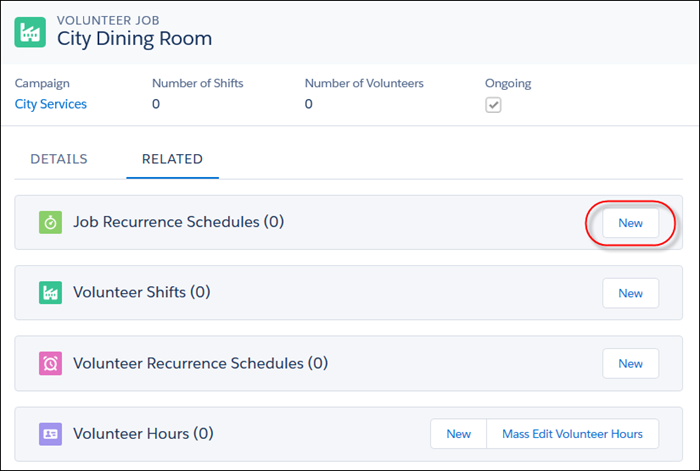
- In the Campaign's Volunteer Jobs related list, click on the Job name.
- On the Job detail page, click the Related tab.
- In the Job Recurrence Schedules related list, click New.
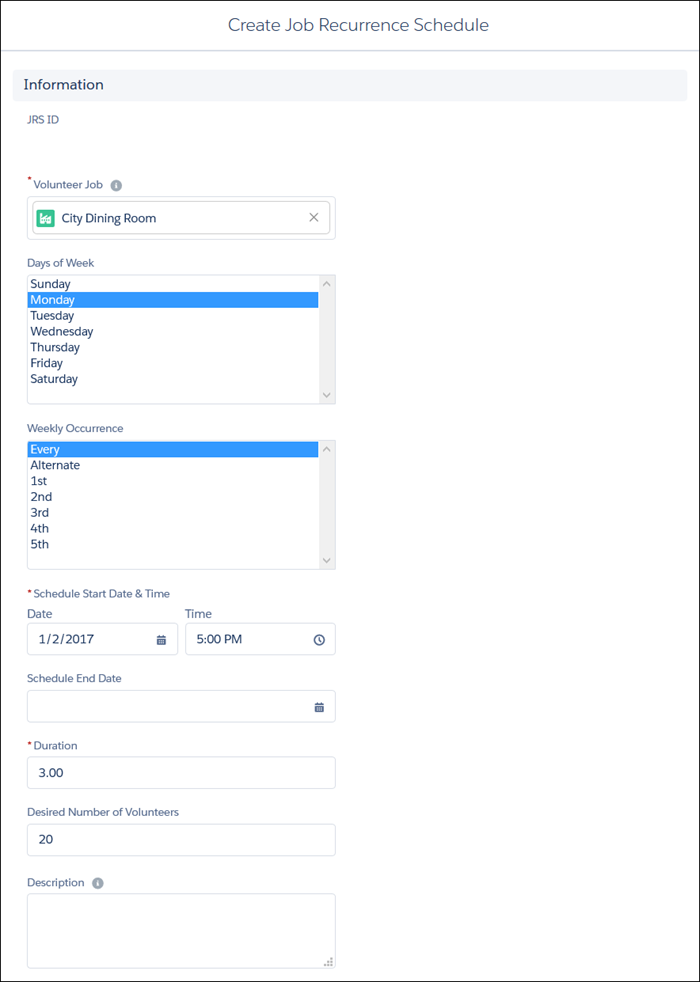
- Define how the Job and its Shifts repeat.
- Days of the Week—The day(s) of the week that the event occurs.
- Weekly Occurrence—How often the event occurs (every week, every other week, the first week of the month, second week of the month, and so on).
- Scheduled Start Date and Time—The date of the first event in the series and what time each event starts.
-
Scheduled End Date—Date of the last event
in the series (if there are a finite number of events). Leave this field
blank if there is no end date. Note V4S only creates future Shifts for a certain number of months, specified in the Job Future Months V4S setting. Your admin can adjust this value. For more information, see Configure Scheduling of Recurring Jobs and Volunteers.
- Duration—How long, in hours, the event lasts.
- Desired Number of Volunteers—The maximum number of volunteers who can sign up for each Shift.
- Click Save.
You can confirm the newly-created Shifts on the Shift Calendar. You can also set up a corresponding Volunteer Recurrence Schedule if you have volunteers who want to set up a recurring schedule based on the recurring Shifts.
Ratkaisiko tämä artikkeli ongelmasi?
Anna palautetta, jotta voimme kehittyä!
