您在此处:
Quip 中的文档链接
将重要文档链接到 Salesforce 记录。通过将文档链接到相关 Salesforce 记录,使在 Salesforce 中查找文档更加简单。
本文章是否解决您的问题?
请与我们共享您的想法,以便我们进行改进!
您在此处:
将重要文档链接到 Salesforce 记录。通过将文档链接到相关 Salesforce 记录,使在 Salesforce 中查找文档更加简单。
| 适用于:Enterprise、Performance、Professional、Developer 和 Unlimited Edition |
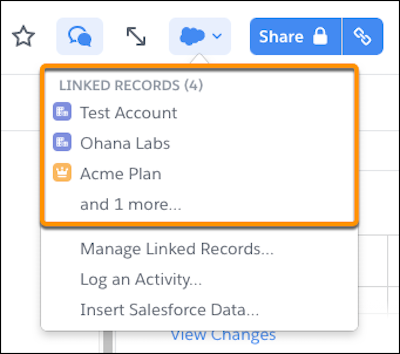
通过将您的帐户计划链接到 Salesforce 中的相关帐户来管理它们。您可以从 Salesforce 中的客户页面轻松访问链接的文档,或者从 Quip 中的文档查看文档链接到的记录。
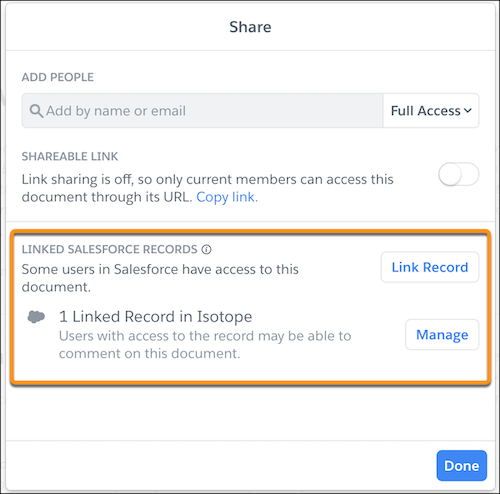
在 Quip 中链接文档也使查看文档何时通过同步共享与其他人共享更容易。从共享窗口中,用户可以看到哪些 Salesforce 组织启用了同步共享,以及将访问级别设置为什么。
当文档通过 Quip 关联文档组件链接到 Lightning Experience 中的记录时,您还可以从文档中查看链接的记录。

We use three kinds of cookies on our websites: required, functional, and advertising. You can choose whether functional and advertising cookies apply. Click on the different cookie categories to find out more about each category and to change the default settings.
Privacy Statement
Required cookies are necessary for basic website functionality. Some examples include: session cookies needed to transmit the website, authentication cookies, and security cookies.
Functional cookies enhance functions, performance, and services on the website. Some examples include: cookies used to analyze site traffic, cookies used for market research, and cookies used to display advertising that is not directed to a particular individual.
Advertising cookies track activity across websites in order to understand a viewer’s interests, and direct them specific marketing. Some examples include: cookies used for remarketing, or interest-based advertising.