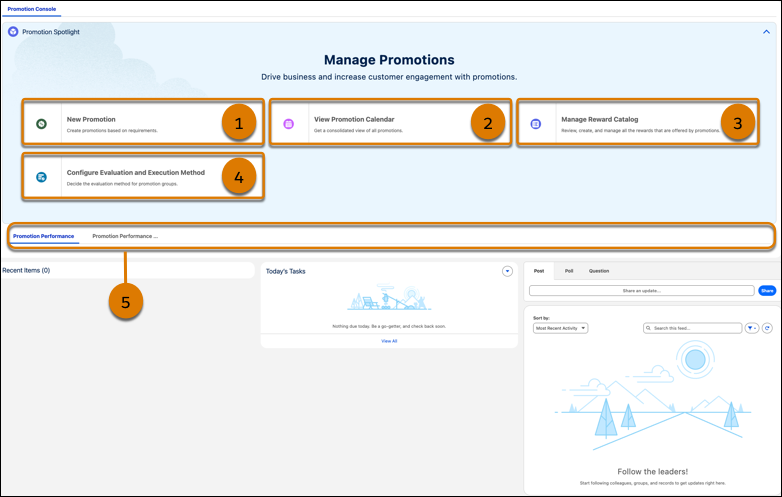
On the Promotion Console home page, marketing managers manage all the tasks related to
promotions. Marketing managers can create promotions within or outside the company’s loyalty
program.
Required Editions
Available in: Lightning Experience
Available in: Enterprise, Performance, Unlimited,
and Developer Editions with Loyalty Management
Callout
Component
What It Does
1
New Promotion
Marketing managers can launch the Quick Promotion wizard and create promotions
that the company wants to run outside the loyalty program.
2
View Promotion Calendar
Marketing managers can view the promotion calendar and view the details of
expired, active, and upcoming promotions. On the calendar, marketing managers can also
view the company’s events and plan promotions in conjunction with the company’s
events.
3
Manage Reward Catalog
Marketing managers can add the rewards that they want to offer customers as part
of the promotions that they want to run for the company outside the loyalty
program.
4
Configure Evaluation and Execution Method
Marketing managers can select an evaluation method for promotion subgroup within
the parent group that is automatically created for each Global Promotions Management
rule library.
5
Analytics tab
Marketing managers can track the performance of their promotions, including the
promotions that belong to the company’s loyalty program.
¿Resolvió este artículo su problema?
¡Háganos saber cómo podemos mejorar!
Cargando
Salesforce Help | Article
Cookie Consent Manager
General Information
Required Cookies
Functional Cookies
Advertising Cookies
General Information
We use three kinds of cookies on our websites: required, functional, and advertising. You can choose whether functional and advertising cookies apply. Click on the different cookie categories to find out more about each category and to change the default settings.
Privacy Statement
Required Cookies
Always Active
Required cookies are necessary for basic website functionality. Some examples include: session cookies needed to transmit the website, authentication cookies, and security cookies.
Functional Cookies
Functional cookies enhance functions, performance, and services on the website. Some examples include: cookies used to analyze site traffic, cookies used for market research, and cookies used to display advertising that is not directed to a particular individual.
Advertising Cookies
Advertising cookies track activity across websites in order to understand a viewer’s interests, and direct them specific marketing. Some examples include: cookies used for remarketing, or interest-based advertising.