
You are here:
Define Promotion Eligibility
On the Define Promotion Eligibility step in the Quick Promotion guided flow, marketing managers decide the products, channels, customer groups, and customer events that are eligible for the promotion. Marketing managers also decide whether customers must sign up for the promotion before they can use it. They can also choose to add coupons to the promotion.
Required Editions
| Available in: Lightning Experience |
| Available in: Enterprise, Performance, Unlimited, and Developer Editions with Loyalty Management |
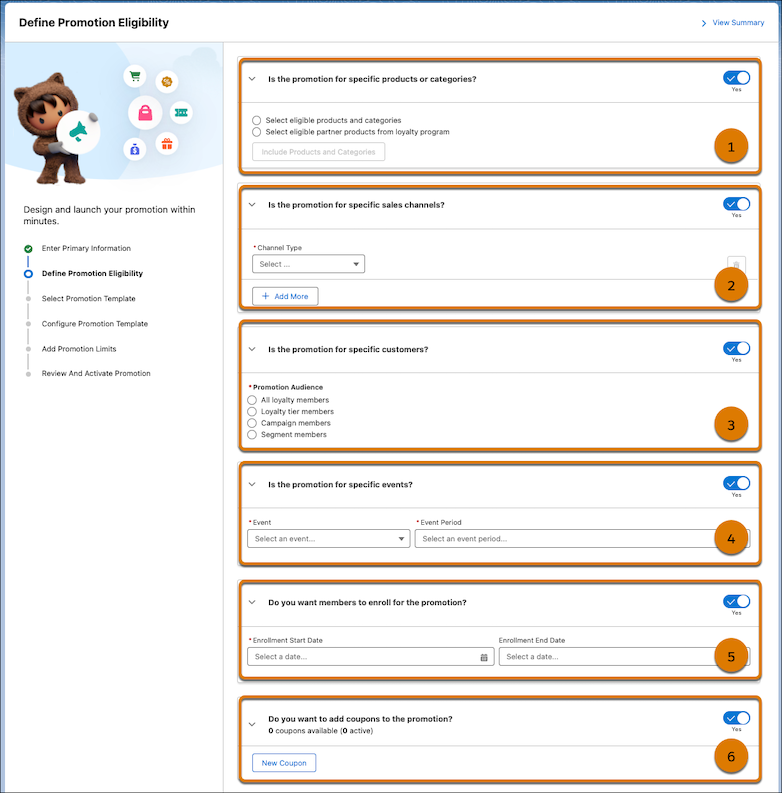
Eligible Products or Categories (1)
Marketing managers can decide the products or product categories that are eligible for the promotion. They can select a promotion’s products or categories from these options.
| Option | What Marketing Managers Can Select | What Happens in the Next Steps |
|---|---|---|
| Products and categories | Marketing managers can select the products and categories eligible for the promotion. | If the marketing manager selects products and categories, then they can’t select the Accrual Events template on the Select Promotion Template step. |
| Partner products form loyalty program | Marketing managers can select the partner products of the promotion’s loyalty program that are eligible for the promotion. | If the marketing manager selects partner products, then they can’t select the pricing templates on the Select Promotion Template step. |

If the marketing manager doesn’t select the eligible products and categories, the products or categories aren't available for selection in promotion rules. To easily identify the products that you’re looking for, search using their SKU or code.

Eligible Channels (2)
Marketing managers can choose the channels that customers must shop from to be eligible for the promotion. Marketing managers can select multiple channels for the promotion.
| Channel Type | what Can Be Selected |
|---|---|
| Online | Marketing managers can select one or more of these online channels.
|
| Offline | Marketing managers can select the retail stores or retail store groups that they want to run the promotion for. |
| Social | Marketing managers can select one of these social channels. |
If the marketing manager doesn’t select an eligible channel, then all channels are considered as eligible channels of the promotion.
Eligible Customer Groups (3)
Marketing managers can select the target audience of the promotion. Customers who are part of the target audience receive the promotion launch email and are the only people who are eligible to use the promotion.
Marketing managers can decide the target audience for promotions in these ways.
| Audience Type | When the Audience Type is Available | What Marketing Managers Can Select |
|---|---|---|
| All loyalty members | These audience types are available only when the promotion belongs to a loyalty program | The marketing manager isn't required to select any other option. When they select All loyalty members as the audience type, all members of the promotion’s loyalty program are eligible for the promotion. |
| Loyalty tier members | The marketing manager must select the tiers of the promotion’s loyalty program whose members are eligible for the promotion. | |
| Campaign members | These audience types are available for promotions that belong to a loyalty program and for promotions that run outside the loyalty program. | The marketing manager must select a campaign whose members are eligible for the promotion. To make sure that a customer or loyalty program member is part of a campaign, the customer or loyalty program member’s Contact record must be a member of the campaign.To learn how to add contacts to a campaign, see Add Campaign Members. If your company uses person accounts to manage customers, ensure that the campaign's members are the contacts associated with the eligible person accounts. |
| Segment members | The marketing manager must select the Data Cloud segments whose audience is eligible for the promotion. To select a Data Cloud segment, the org must have Data Cloud enabled. |
If you don’t select an eligible customer group, then all contacts are considered eligible for the promotion.
Eligible Events (4)
If the company wants customers to use the promotion on special occasions, the marketing manager can select the occasion that customers are eligible to use the promotion on.
Here’s the list of events that you can create promotions for.
| Event Type | Event Period | How It Works | How The Date is Found |
|---|---|---|---|
| Customer’s birthday | Birthday | Customers can use the promotion on their birthday. If the customer’s birthday is on Feb 29, then the customer can use the promotion on February 29 of leap years and on March 1 of non-leap years. | You can find the birthday from the customer’s Contact record. |
| Birthday Week | Customers can use the promotion during their birthday week. The birthday week is from Sunday through Saturday of the week that the customer’s birthday falls in. | ||
| Birthday Month | Customers can use the promotion during their birthday month. The birthday month is the month that the customer’s birthday falls in. | ||
| Member’s birthday | Birthday | This event is available only for the promotions that belong to a loyalty program. Members of the promotion’s loyalty program can use the promotion on their birthday. If the member's birthday is on Feb 29, then the member can use the promotion on February 29 of leap years and on March 1 of non-leap years. | You can find the birthday from the member’s Contact record. |
| Birthday Week | This event is available only for the promotions that belong to a loyalty program. Members of the promotion’s loyalty program can use the promotion during their birthday week. The birthday week is from Sunday through Saturday of the week that the member’s birthday falls in. | ||
| Birthday Month | This event is available only for the promotions that belong to a loyalty program. Members of the promotion’s loyalty program can use the promotion during their birthday month. The birthday month is the month that the member’s birthday falls in. | ||
| Member’s membership anniversary | Anniversary Day | This event is available only for the promotions that belong to a loyalty program. Members of the promotion’s loyalty program can use the promotion on their membership anniversary day. If the membership anniversary is on Feb 29, then the member can use the promotion on February 29 of leap years and on March 1 of non-leap years. | You can find the membership anniversary date from the enrollment date that’s specified in the member’s Loyalty Program Member record. |
| Anniversary Week | This event is available only for the promotions that belong to a loyalty program. Members of the promotion’s loyalty program can use the promotion during their membership anniversary week. The membership anniversary week is from Sunday through Saturday of the week that the membership anniversary falls in. | ||
| Anniversary Month | This event is available only for the promotions that belong to a loyalty program. Members of the promotion’s loyalty program can use the promotion during their membership anniversary month. The membership anniversary month is the month that the membership anniversary falls in. |
If you don’t select an event, the customers or members can use the promotion any day between the promotion’s start and end dates.
Enrollment Requirement (5)
Marketing managers can decide whether a customer must enroll in a promotion before they can receive its benefits. They can also define the window during which customers can enroll. If a promotion doesn’t have a specified enrollment period, they can select the promotion start date as the enrollment start date and leave the enrollment end date blank.
Coupons (6)
Companies can offer customers the flexibility to choose their preferred promotions by adding coupons to promotions.
These are the key reasons to use coupons in your promotions:
| use case | Example |
|---|---|
| Cost-efficient promotions | A sales rep can choose to apply a promotion to a cart based on whether the customer requires it or not. |
| Branded promotions | Cloud Kicks partners with NTO to offer a personalized coupon named “CloudKicksNTO20”. Customers who purchase a Cloud Kicks product receive a 20% discount on NTO products. |
A promotion can include multiple coupons. You can configure coupons in these ways depending on your promotional requirements.
| Business Requirements | How To Achieve It | Customer Experience |
|---|---|---|
| The promotion has one coupon for all customers | Add only one coupon to the promotion. | To apply the promotion, all customers use the same coupon code. |
| The promotion has multiple coupons for different periods with individual usage limits | Add unique coupons for each period. Multiple coupon codes ensure that customers can't use the same coupon code for an extended duration. |
To apply the promotion, customers must use the promotion coupon active for their activity date. |
| The promotion provides unique coupons for each eligible customer | Add unique coupons for each customer with overlapping start and end dates. You can set up a custom process to inform customers about their coupon. |
To apply the promotion, customers must use their own coupon code. |
When adding a coupon, the marketing manager must specify these details about each coupon:
- A unique code for each coupon.
- A limit for the number of times all eligible customers can use the coupon. The maximum limit is 1000 times per promotion.
- A limit for the number of times each eligible customer can use the coupon. The maximum limit is 1000 times per buyer.
- The start and end dates between which the coupon is available for the customers to use.
- The status of the coupon.
Customers can only use the coupon when its status is active.
