You are here:
Build Your App's Skeleton
Describe an app in plain language and Agentforce creates the first version.
Required Editions
| Available in: Lightning Experience |
| Available in: Enterprise, Performance, Unlimited, and Developer Editions with Foundations, or Agentforce 1 or Einstein 1 Editions |
| User Permissions Needed | |
|---|---|
| To build agentic mobile apps: | Manage mySalesforce Apps |
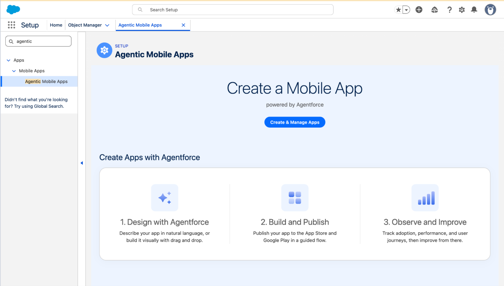
The Create & Manage Apps screen is home for every agentic mobile app in your org. Start a new app or reopen an existing app from this screen.
-
On the Agentic Mobile Apps page, click Create & Manage Apps
to access the Agentforce interface and describe the app you want.
For example, enter Build an app so partners can see their opportunities and accounts.
- Answer the clarifying questions that Agentforce asks.You can ask Agentforce to add theming from Figma files. To do that, share a file with mobile screens designed as individual frames and attach the Figma access token. Share the Figma URL (until "?node").
- Select a customer-facing app based on an Experience Cloud site or an employee app based on your Salesforce org.
- Agentforce builds the first version.
The app opens in the Mobile App Designer. You can change anything until you activate and publish the app.
Did this article solve your issue?
Let us know so we can improve!
