Salesforce Suites give you more than one way to send an email to a list, and each way
defines its audience differently. Knowing which one you’re in explains what you see when you
pick your recipients.
Required Editions
Available in: Lightning Experience
Available in: Free, Starter and Pro Suite Editions.
Use this table to find the right starting point for sending an email.
When You Want To…
Your Audience Comes From…
Start Here…
Send a sales email to a group of leads
The filtered Leads list view itself
The Leads list view in the Sales app
Send a sales email to a group of contacts
The filtered Contacts list view itself
The Contacts list view in the Sales app
Send a marketing email to a list of leads
An Actionable List
The Leads list view in the Marketing app
Send a marketing email to a list of contacts
An Actionable List
The Contacts list view in the Marketing app or the List Sends tab
Send a marketing email as part of a campaign
A segment
The campaign record in the Marketing app
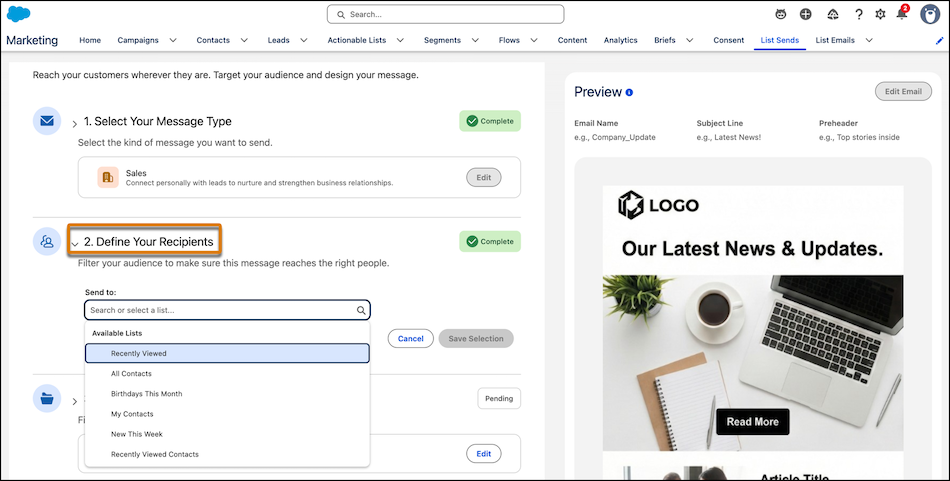
You can access the List Sends composer from different starting points. Once in the List Sends
composer, choose which Actionable List to send your message to in Step 2. For most starting
points, the dropdown defaults to lists of contacts. To send your message to a list of leads,
start from a Leads list view.
Note Because the Sales app and the Marketing app send emails using different mechanisms, your
recipient options look different depending on which type of email you’re sending or from where
you start your email. For example, when creating a marketing list email from the List Sends
tab, you can only select a contact-based actionable list. These differences are expected.
Konnten Sie Ihr Problem mithilfe dieses Artikels lösen?
Geben Sie uns Feedback, damit wir uns verbessern können.
Laden
Salesforce Help | Article
Cookie Consent Manager
Cookie Consent Manager
General Information
Required Cookies
Functional Cookies
Advertising Cookies
General Information
We use three kinds of cookies on our websites: required, functional, and advertising. You can choose whether functional and advertising cookies apply. Click on the different cookie categories to find out more about each category and to change the default settings.
Privacy Statement
Required Cookies
Always Active
Required cookies are necessary for basic website functionality. Some examples include: session cookies needed to transmit the website, authentication cookies, and security cookies.
Functional Cookies
Functional cookies enhance functions, performance, and services on the website. Some examples include: cookies used to analyze site traffic, cookies used for market research, and cookies used to display advertising that is not directed to a particular individual.
Advertising Cookies
Advertising cookies track activity across websites in order to understand a viewer’s interests, and direct them specific marketing. Some examples include: cookies used for remarketing, or interest-based advertising.