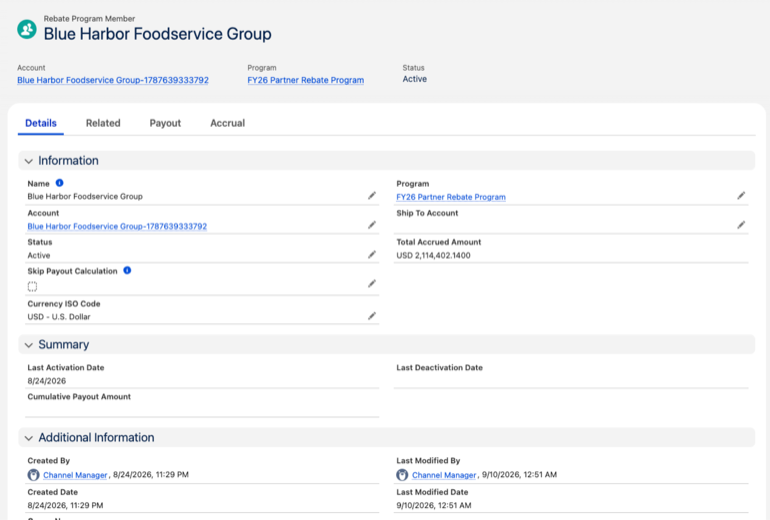
When Advanced Rebates is enabled, Rebate Program Member record pages feature dedicated
Payout and Accrual tabs to give program managers and finance teams clear visibility into
calculated financial metrics.
Required Editions
Available in: Enterprise, Unlimited, and Developer Editions that have Rebate and Accrual Management Advanced enabled.
Switch between the Payout and Accrual tabs on the member record page to isolate settled
disbursements from accrued liabilities.
Use the Payout tab to view:
Rebate Type Details: Review summary payout metrics aggregated across each rebate
type, including Payout Amount, Measure Type, Benefit Qualifier Value, and Measure
Value.
By Payout Periods: Expand specific fiscal payout periods to inspect period-level
totals (Status, Start Date, End Date, Rebate Amount, Adjustment Amount, and Payout
Calculation Date) alongside individual Rebate Type Payout records.
Use the Accrual tab to view:
Rebate Type Accrual Details: Review summary accrual metrics aggregated across each
rebate type, including Measure Type, Measure Value, Benefit Qualifier Value, and Accrual
Amount.
By Payout Periods: Track accrued financial liabilities categorized within specific
payout period windows, featuring Delta Amount tracking (Payout - Accrual) alongside
associated Rebate Type Payout records.
By Accrual Periods: Expand specific monthly or weekly accrual periods to inspect
period-level totals (Status, Start Date, End Date, Accrual Amount, Adjustment Amount, and
Accrual Calculation Date) alongside detailed Program Rebate Type Accrual records.
Note The Payout and Accrual tabs are visible on member record pages when both Classic and
Advanced Rebates are enabled in your org, or when Advanced Rebates is active on the selected
program.
Did this article solve your issue?
Let us know so we can improve!
Loading
Salesforce Help | Article
Cookie Consent Manager
Cookie Consent Manager
General Information
Required Cookies
Functional Cookies
Advertising Cookies
General Information
We use three kinds of cookies on our websites: required, functional, and advertising. You can choose whether functional and advertising cookies apply. Click on the different cookie categories to find out more about each category and to change the default settings.
Privacy Statement
Required Cookies
Always Active
Required cookies are necessary for basic website functionality. Some examples include: session cookies needed to transmit the website, authentication cookies, and security cookies.
Functional Cookies
Functional cookies enhance functions, performance, and services on the website. Some examples include: cookies used to analyze site traffic, cookies used for market research, and cookies used to display advertising that is not directed to a particular individual.
Advertising Cookies
Advertising cookies track activity across websites in order to understand a viewer’s interests, and direct them specific marketing. Some examples include: cookies used for remarketing, or interest-based advertising.