You are here:
Export License Utilization Data
Export your license utilization data to a CSV file to review it holistically or analyze it in an external tool.
This exported data gives you a complete view of license consumption in a CSV file you can review, sort, or import into an external business intelligence (BI) tool for further analysis, forecasting, or reporting.
You can also use this data for license audits, because the file captures what was provisioned and assigned at the time you exported it. And you can share this file with stakeholders, such as procurement or finance, if they don’t require access to Digital Wallet.
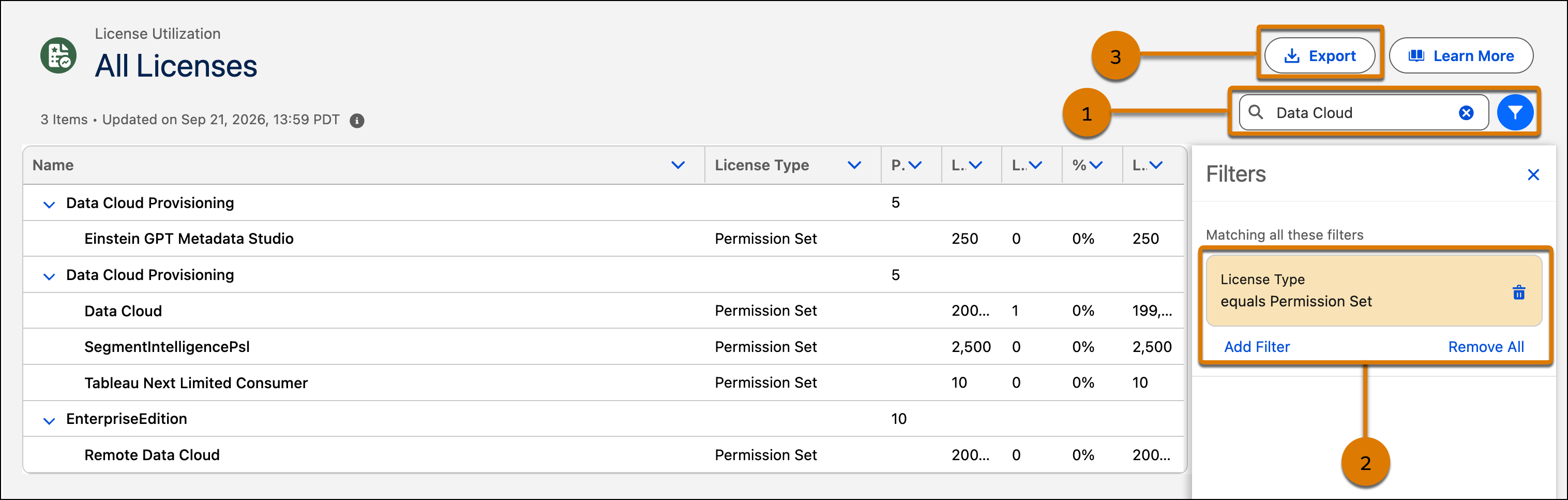
You can export all your license data or a filtered subset. If you want to include only a subset of data, select those filters before you begin the export process. In this example, the license view is filtered to show only Data Cloud licenses (1) with the permission set license type (2).
- From the App Launcher, find and select Digital Wallet, then select License Utilization.
- (Optional) Use the Search (1) or Filter (2) feature, or both, to select a subset of licenses.
- Click Export (3).
- Choose what data to export: All Data or Filtered Data.
-
Select an encoding format.
- ISO-8859-1 (General US & Western Europe) is a single-byte encoding that covers standard English and Western European characters. Select this format if your data is primarily in English or a Western European language and you're opening the file in an older version of Excel or another tool that expects this format by default.
- Unicode (UTF-8) is a flexible, multi-byte encoding that supports virtually any language or character set, including symbols and non-Latin scripts. Select this format if your license or product names include characters outside Western European languages, or if you're importing the file into modern tools and databases that expect UTF-8 as the standard.
- Unicode (UTF-16, Big Endian) is a multi-byte encoding that also supports all Unicode characters, but stores them in a different byte order than UTF-8. Select this format only if a specific downstream system or legacy app requires UTF-16 Big Endian files for import.
- Click Export.
- Find the CSV file in your Downloads folder.
