You are here:
Grant Login Access
If you need help resolving a problem, you can grant a Salesforce administrator or a support representative login access to your account.
Required Editions
| Available in: both Salesforce Classic and Lightning Experience |
Available in: all editions Granting administrator access is available in: Enterprise, Performance, Unlimited, Developer, and Database.com Editions |
| User Permissions Needed | |
|---|---|
| To view setup audit trail history: | View Setup and Configuration |
By default, your company’s administrators can access your account without any action from you. If your organization requires users to grant login access to administrators, you can grant access for a specified duration. You can also grant access to a Salesforce support representative.
For security reasons, the maximum period for granting access is 1 year. After you grant access, administrators or support representatives can use your login and access your data to help you resolve problems.
-
At the top of any Salesforce page, click your image, and then click
Settings.
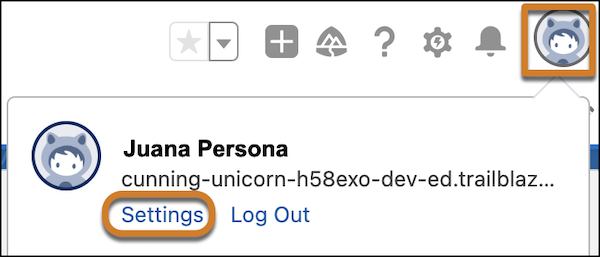
- In the Quick Find box, enter Grant, and then select Grant Account Login Access.
- To set the access expiration date for your company’s administrator or for Salesforce.com support, choose a value from the Access Duration picklist.
- Save your work.
If an administrator, support representative, or publisher makes setup changes using your login, the setup audit trail lists the changes and the username. In some organizations, records of clicks made by an administrator logged in as you are also kept for auditing purposes.

