You are here:
Email Application Publisher Layouts
Salesforce admins can set up Outlook integration and Gmail integration users to create accounts, cases, leads, opportunities, and custom objects directly from their email applications. Reps create records using actions menus, which you can set up from Salesforce. Your company’s Salesforce edition determines how you set up action menus and whether you can customize them.
Required Editions
| Outlook integration and Gmail integration are available from both Salesforce Classic and Lightning Experience |
| Action menus are available in: All Editions |
| Customizable email application action menus are available in: Enterprise, Performance, Unlimited, and Developer Editions |
| User Permissions Needed | |
|---|---|
| To create actions, customize, and assign email application action menus: | Customize Application |
| To view email application publisher layouts: | View Setup and Configuration |

You can set up action menus for reps working from Outlook integration and Gmail integration.
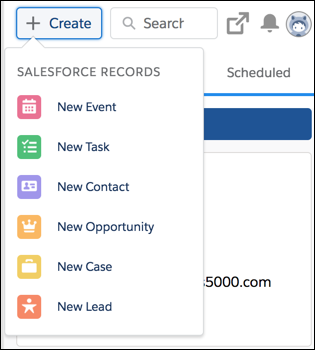
Follow these steps to set up action menus for reps to access from their email applications.
- Create quick actions for email application action menus
-
Add actions to the appropriate publisher layout.
If you’re working from Contact Manager, Group, or Professional Edition, add actions to the global publisher layout. These actions display for all action menus that use the global publisher layout. However, reps see only Create a Record actions from their email applications.
 Note Salesforce includes a Log a Call quick action that is available to add to a Global Publisher Layout, but isn’t available in the Outlook or Gmail integrations. To add an action to log a call from Outlook and Gmail, create a quick action with Action Type set to Create a Record and Target Object set to Task.
If you’re working from Enterprise, Performance, Unlimited, or Developer Edition, you can customize action menus for email applications by creating publisher layouts specifically for email applications. You can create multiple layouts to give different reps access to different actions.
- Give reps access to their action menus.
- Create Quick Actions for the Salesforce Side Panel Action Menu
Take the first step in preparing your Outlook integration and Gmail integration users to create records directly from Outlook or Gmail. The Salesforce side panel action menu lets users create accounts, cases, contacts, leads, opportunities, or custom object records without opening Salesforce. You choose which actions appear in users’ action menus by creating global Create a Record actions for each kind of record. - Customize Email Application Action Menus
Take the second step in preparing reps to create records directly from the Outlook integration or the Gmail integration. You can create multiple layouts to give different reps access to different actions. - Assign Email Application Publisher Layouts to User Profiles
Enterprise, Performance, Unlimited, and Developer Editions let you customize the action menus for Outlook or Gmail using email application publisher layouts. After you’ve created the email application publisher layout, give your users access by assigning it to their user profiles.
