
You are here:
Alternative Call Flow for Handling Calls
If your telephony partner creates a third voice call record (VC3) to transfer the call to a human service rep, use this alternative call flow. For example, you might create a third record if you are unable to transfer VC1 to the rep.
The section highlighted in yellow shows the difference between the recommended and alternative call flows.
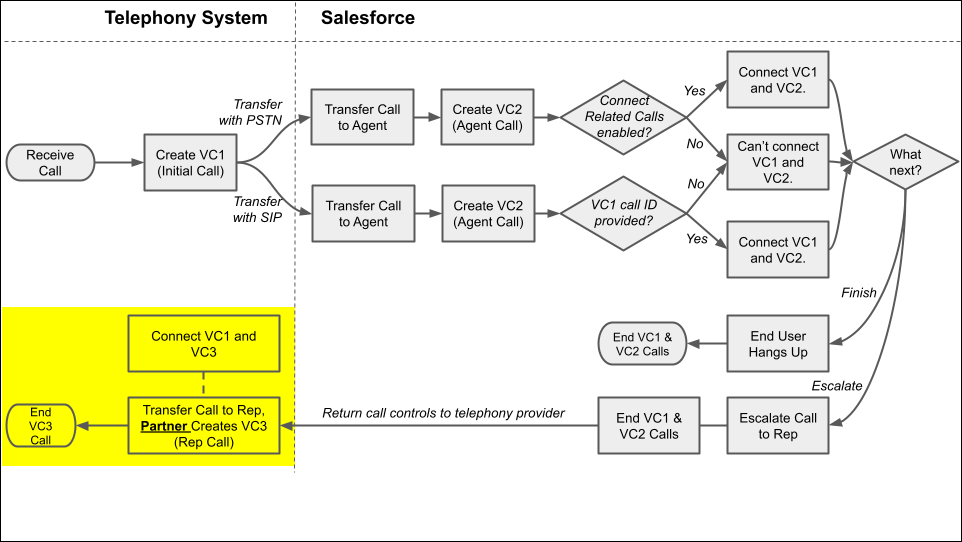
This diagram illustrates these steps in a call flow.
- First, the telephony system receives an incoming call.
-
If configured, the telephony system creates the Initial voice call record (VC1).
 Tip To create a voice call record in Salesforce, use the VoiceCalls Telephony Integration API.
 - If configured, the telephony system transfers the call to an agent using the specified
communication protocol: PSTN or SIP.
-
If the transfer happens with PSTN:
- Salesforce creates the Agent voice call record (VC2).
- If the Connect Related Calls option is enabled for Agentforce Voice, then Salesforce automatically connects the VC1 and VC2 records. If the option is disabled, the voice call records aren’t connected.
-
If the transfer happens with SIP:
- Salesforce creates the Agent voice call record (VC2).
- If the ID of the VC1 voice call record is passed into the
callidparameter in the UUI header, then Salesforce automatically connects the VC1 and VC2 records. If the parameter isn’t provided, the voice call records aren’t connected.
-
-
If the customer hangs up, the VC1 and VC2 calls end.
-
If the agent escalates the call to a human service rep, transfer the call to the rep, end VC1 and VC2, and create VC3. Connect VC3 with VC1 or VC2, whichever works best for you. When the conversation concludes, the VC3 call ends.
Tip If your partner supports setting the previous voice call when they create a voice call record for the Rep voice call (VC3), enter VC2’s ID as the previous call ID. If your partner doesn’t support it, do it manually. For inspiration, check out Alternative Call Flow for Handling Calls.
