
Connect a Service Agent to Partner Telephony
Route voice conversations to your Agentforce Service agents. Learn how to create a telephony connection to your partner telephony system, configure voice mode settings, and route calls to your agent.
Required Editions
| Available in: Lightning Experience |
| Available in: Enterprise, Unlimited, and Developer Editions with Foundations or Agentforce 1 Editions, and Salesforce Voice add-ons. |
Watch this video for a demonstration of how to route voice conversations to an Agentforce Service agent.
This flow chart summarizes the setup steps.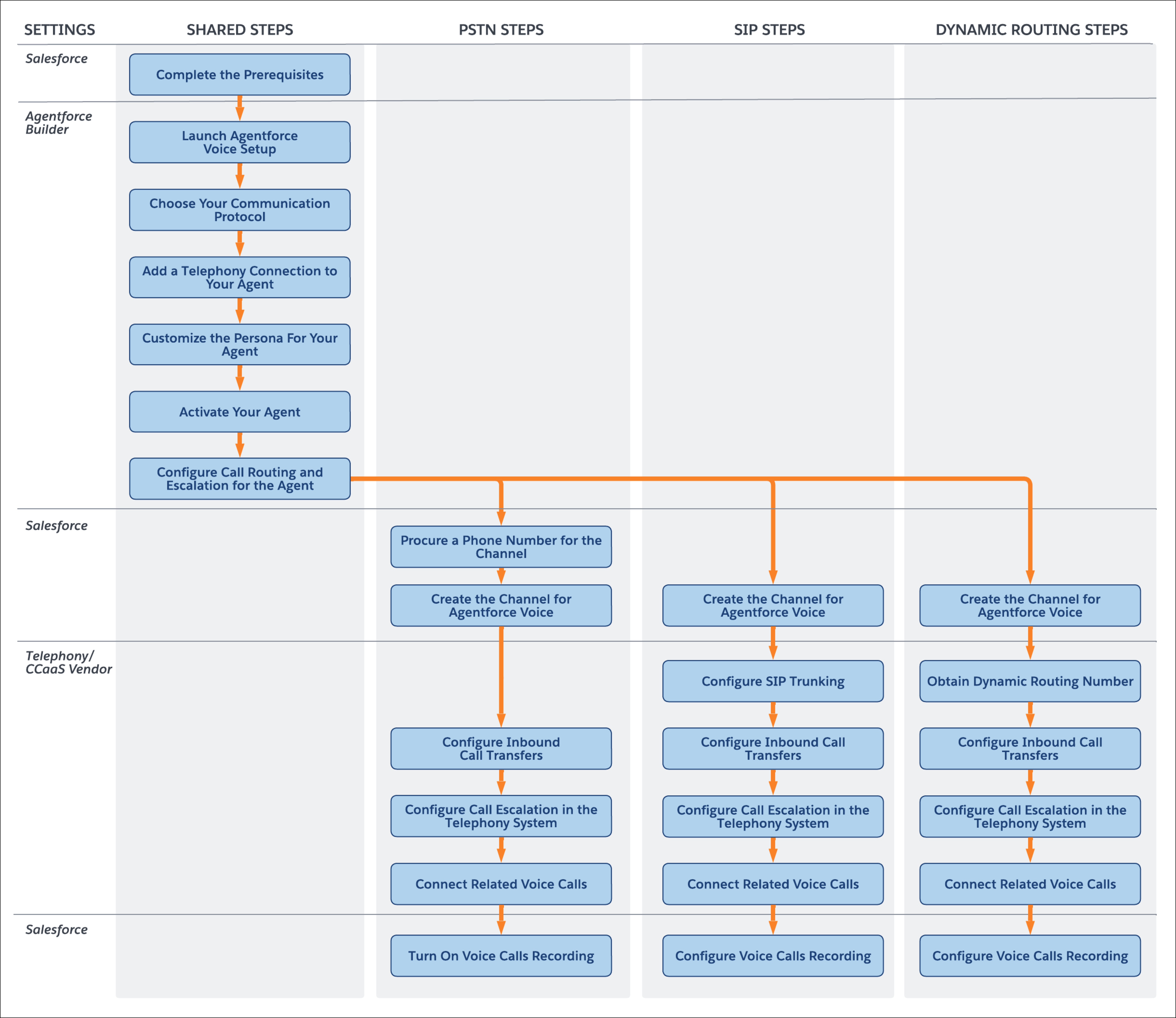
Roles of Agentforce Voice and Salesforce Voice with Telephony Providers
Agentforce Voice is the conversational AI capability built into Agentforce. Agentforce Voice processes voice interactions, understanding the customer intent and generating spoken responses.
Salesforce Voice with Telephony Providers integrates third-party telephony systems, such as Amazon Connect, Genesys, and CCaaS systems, with Salesforce. To use Agentforce Voice, at minimum, Voice with Telephony Providers must be turned on–a complete setup isn’t required. For example, if you are using CCaaS, you just need to turn on Voice with Telephony Providers. Although, with a complete Voice with Telephony Providers setup, Agentforce Voice integrates seamlessly into your contact center, making it easy to handle scenarios such as agent escalation and context passing.
Agentforce Voice and Voice with Telephony Providers work together to transform your contact center from traditional, static telephony into an intelligent, conversational experience. With Agentforce Voice and Voice with Telephony Providers, provide 24/7 support with built-in agent transfer and escalation capabilities when your customers need them.
- Complete the Prerequisites
Before you connect an agent to your partner telephony system, complete these prerequisites. - Launch Agentforce Voice Setup
Agentforce Voice Setup walks you through the entire setup process. - Choose Your Communication Protocol
You can set up Agentforce Voice with the PSTN, SIP, or Dynamic Routing communication protocol. The steps vary based on the protocol. - Configure Call Routing and Call Escalation for the Agent
Configure an Omni-Channel flow to transfer inbound calls to the voice-enabled agent. Create an escalation Omni-Channel flow to disconnect the agent and, if supported by your telephony or CCaaS system, transfer the call to a rep. Add the activated escalation flow to the agent. - Configure the Channel and Telephony Settings for PSTN
Create a channel that's used to manage inbound calls routed to the Agentforce agent. If supported, configure your telephony system to create a VoiceCall record in Salesforce for every incoming call, and then transfer each call to the Agentforce agent using the procured phone number. When needed, transfer the call to a human service rep. - Configure the Channel and Telephony Settings for SIP or Dynamic Routing
Create a channel that’s used to manage inbound calls routed to the Agentforce agent. If supported, configure your telephony system to create a VoiceCall record in Salesforce for every incoming call, and then transfer each call to the Agentforce agent using the SIP address or dynamic routing phone number. When needed, transfer the call to a human service rep. - Connecting Related Voice Calls
When a customer conversation involves call transfers, a separate voice call record can be created in Salesforce for each call segment. This action results in multiple voice call records for the same conversation. To provide a single, comprehensive view and preserve the full call context, connect these related voice call records. Connecting records enables more informed decisions. For instance, you can escalate the call to the appropriate rep based on all gathered information.
