
You are here:
Recommended Call Flow for Handling Calls
The recommended call flow minimizes the number of voice call records and connects related records. When possible, use this flow for handling the different legs of the call.
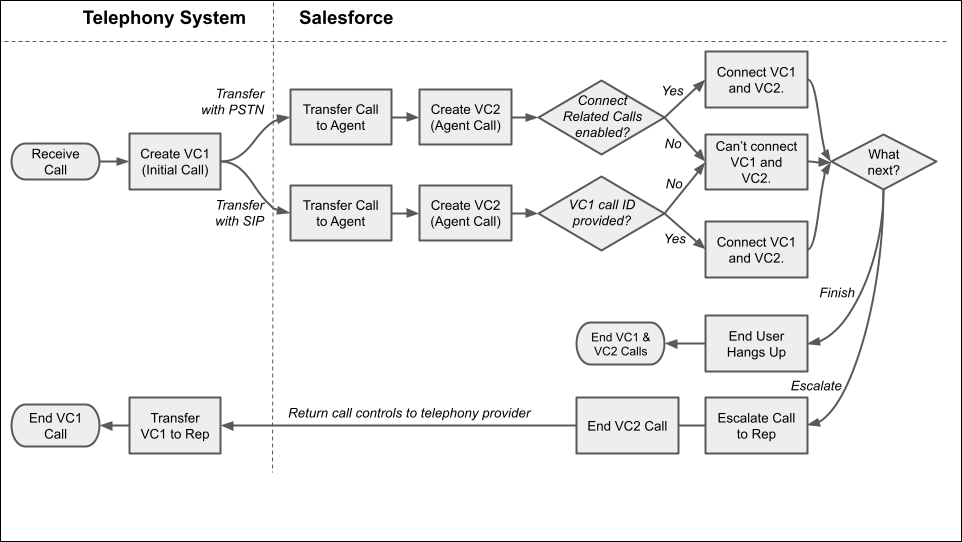
This diagram illustrates these steps in a call flow.
- First, the telephony system receives an incoming call.
- If configured, the telephony system creates the Initial voice call record (VC1).
 Tip To create a voice call record in Salesforce, use the VoiceCalls Telephony Integration API.
 - If configured, the telephony system transfers the call to an agent using the specified
communication protocol: PSTN or SIP.
- If the transfer happens with PSTN:
-
Salesforce creates the Agent voice call record (VC2).
-
If the Connect Related Calls option is enabled for Agentforce Voice, then Salesforce automatically connects the VC1 and VC2 records. If the option is disabled, the voice call records aren’t connected.
-
-
If the transfer happens with SIP:
-
Salesforce creates the Agent voice call record (VC2).
-
If the ID of the VC1 voice call record is passed into the
callidparameter in the UUI header, then Salesforce automatically connects the VC1 and VC2 records. If the parameter isn’t provided, the voice call records aren’t connected.
-
- If the transfer happens with PSTN:
-
If the customer hangs up, the VC1 and VC2 calls end.
-
If the call is escalated from the agent to a human service rep, the VC2 call ends and the call controls are returned to the telephony provider, which uses the VC1 call. When the call finishes, the VC1 call ends.
