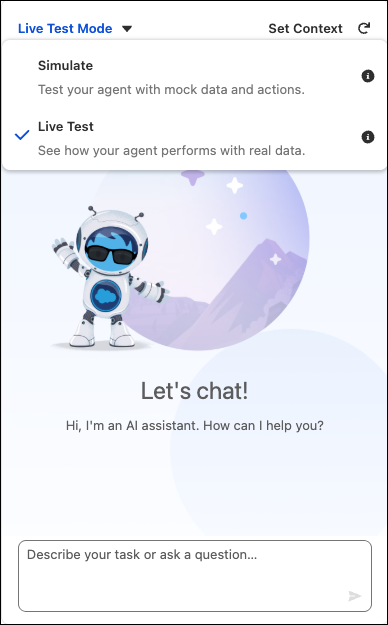
Agentforce Builder includes two different modes to test your agent: Simulate and Live
Test. Simulate mode helps you verify that your agent has the right configuration without risking
any changes to your actual data or org. Live Test mode actually runs the actions and changes
your org so you can see how the agent performs when it’s active.
Simulate mode offers a risk-free testing space. It's designed to check the agent's
setup—including its underlying logic and workflow—without changing your data. Use this mode
to verify that the agent is selecting the right subagents and actions and responding how you
want it to.
Working in this mode enables quick adjustments, troubleshooting, and confirmation of fixes
or new logic. It’s the best place to confirm the agent's initial configuration and validate
all setup parameters. When you’re confident your agent is behaving as expected, you’re ready
to move to Live Test mode.
Live Test Mode
Live Test mode is designed to test the agent's performance and behavior under conditions
that are similar to the production environment. When you’re testing in this mode, the agent
behaves as if it’s activated. The tests check its ability to run subagents and perform
actions and it actively updates Salesforce data. This step is important for a complete check
of actions and confirming that data is correct and system integration is working well.
Did this article solve your issue?
Let us know so we can improve!
Loading
Salesforce Help | Article
Cookie Consent Manager
Cookie Consent Manager
General Information
Required Cookies
Functional Cookies
Advertising Cookies
General Information
We use three kinds of cookies on our websites: required, functional, and advertising. You can choose whether functional and advertising cookies apply. Click on the different cookie categories to find out more about each category and to change the default settings.
Privacy Statement
Required Cookies
Always Active
Required cookies are necessary for basic website functionality. Some examples include: session cookies needed to transmit the website, authentication cookies, and security cookies.
Functional Cookies
Functional cookies enhance functions, performance, and services on the website. Some examples include: cookies used to analyze site traffic, cookies used for market research, and cookies used to display advertising that is not directed to a particular individual.
Advertising Cookies
Advertising cookies track activity across websites in order to understand a viewer’s interests, and direct them specific marketing. Some examples include: cookies used for remarketing, or interest-based advertising.