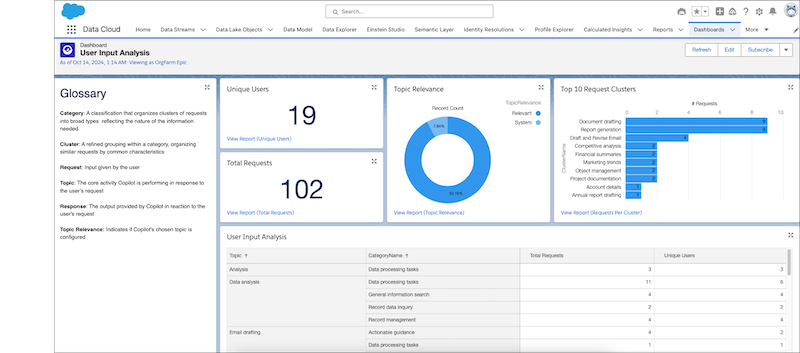
Utterance Analysis lets you quickly see how Agentforce (Default) users are using
agents, what they’re requesting, and whether the agent was able to handle these requests. These
customizable reports can help you refine your subagents and actions so that your agents respond
more effectively and accurately.
Note Agentforce Analytics is scheduled for retirement starting May 2026. We recommend
using Agent Analytics instead.
Important Starting June 17, 2025, Agentforce
(Default) will not include new features or improvements and isn’t available in new
Salesforce environments. We recommend migrating to Agentforce Employee agent for continued
enhancements and support. If you plan to transition to Agentforce Employee agent or make
related license changes, complete the migration of your existing Agentforce (Default) agents
in advance to avoid potential disruption in agent availability. If you can't complete the
migration in advance, you can create new agents after the transition, which can involve some
downtime. See Migrate from Agentforce (Default) to Agentforce Employee
Agent.
Utterance Analysis is in the Agentforce (Default) folder in the Dashboard tab. The dashboard
includes reports that track users, as well as the input and the agent response type. Reports
are run on weekends and the dashboard is updated weekly.
Utterance Analysis brings similar utterances together into Clusters. Those clusters are in
turn grouped into Categories. By grouping information, you can see the overall trends of what
users are asking for.
You can also do a reverse search and filter for unsupported requests, marked as system
subagents, and see when an agent wasn’t able to create a meaningful response. This information
helps to determine when to create subagents and actions that meet what users are
requesting.
Utterance Analysis is built on Data 360 reports, which gives you the
flexibility to customize it to suit your needs. But be sure to clone the report and modify the
clone, not the original, to avoid breaking the analytics processes.
Did this article solve your issue?
Let us know so we can improve!
Loading
Salesforce Help | Article
Cookie Consent Manager
Cookie Consent Manager
General Information
Required Cookies
Functional Cookies
Advertising Cookies
General Information
We use three kinds of cookies on our websites: required, functional, and advertising. You can choose whether functional and advertising cookies apply. Click on the different cookie categories to find out more about each category and to change the default settings.
Privacy Statement
Required Cookies
Always Active
Required cookies are necessary for basic website functionality. Some examples include: session cookies needed to transmit the website, authentication cookies, and security cookies.
Functional Cookies
Functional cookies enhance functions, performance, and services on the website. Some examples include: cookies used to analyze site traffic, cookies used for market research, and cookies used to display advertising that is not directed to a particular individual.
Advertising Cookies
Advertising cookies track activity across websites in order to understand a viewer’s interests, and direct them specific marketing. Some examples include: cookies used for remarketing, or interest-based advertising.