
You are here:
What Are Data Libraries?
Agentforce Data Libraries enhance the accuracy of AI features like Agentforce Agents by connecting them to your trusted data sources. Data libraries use unstructured or semi-structured data so that they can take large sets of information that exist on the web, in documents, or as large text inputs in fields, and turn that into more useful, searchable information.
When you create a data library it automates several configuration steps across Data 360 and Prompt Builder, such as pushing data streams to Data 360, mapping data objects, and creating a search index and retriever. With these steps completed automatically, it’s easy to link agents to your data. You can create and configure libraries from the Agentforce Data Library setup or through Agentforce Builder.
Grounding, Chunking, and Indexing
Grounding adds domain-specific knowledge or customer information to the prompt, giving the LLM context to respond more accurately to a question or task. Grounding sources can include knowledge articles, uploaded files, or conversation transcripts. Lengthy and complicated knowledge articles and uploaded files can take a significant amount of time and processing power to search through for the right information, and LLMs have a maximum token or word limit for the amount of text it can process in a single call. To make the search more efficient, improve relevance, and handle very large datasets, we break down data sources into smaller parts called chunks. Many types of data can be chunked, including text, images, and even audio files.
After data is split into chunks, it’s indexed, or organized and categorized. Indexing simplifies the search and retrieval of data chunks for AI tools. When an AI agent needs information or a user asks a question, instead of searching through an entire document, we use the search index to sort through the chunks and find the ones that are most relevant to a particular query or task. Each chunk in the search index is compared to a similarity score that indicates how much of the text between the query and chunk matches. Chunks with high similarity scores point to relevant articles or sources, which are then returned and added into the prompt. By using this strategy, we can add relevant, context-specific information into a prompt without overwhelming the token limit, and the LLM can draft responses that fit different situations and organizations.
Retrievers
Retrievers act like pointers between data and features. They’re designed to automatically extract and proffer relevant data from different databases, systems, or platforms, cutting down on manual data collection and, at the same time, standardizing the retrieved datasets. Retrievers are particularly important in applications like search engines, question-answering systems, and recommendation systems. When a user asks a question or gets help from AI, the retriever that you assign to each Data Library determines which datasets in Data 360 are available to AI tools in Salesforce. See Using Retrieval Augmented Generation.
What happens when you create a data library?
The processes that connect your data with your AI agents and features kick off as soon as you configure and save your data library. First, a data stream is created, followed by the data lake and data model objects. Then the data lake object is mapped with the data model object. After the data lake and model objects are mapped, the search index is created. For the search index to be created, the previous steps must be successful and active.
After you create a search index, data chunking begins. Chunking time depends on factors like the number, size, and complexity of knowledge articles or uploaded files, and the number of knowledge fields selected for chunking. Web search based data libraries don't create a search index, just a retriever. For file or knowledge based libraries, after chunking is completed and the search index is ready, then the retriever is created. Each Agentforce Data Library has its own retriever regardless of the settings. Retrievers can point to the same search index, but each pointer is unique.
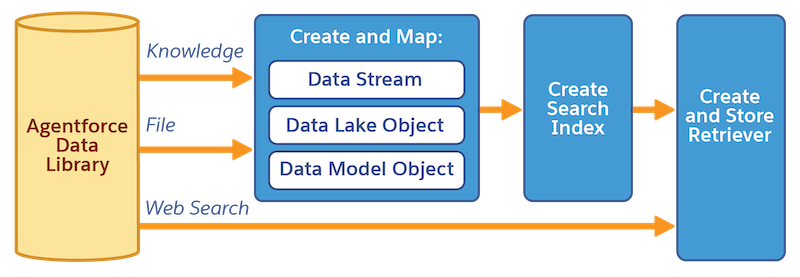
You can monitor each step from the status card in the data library setup page. The status card walks you through each stage as it completes, and links to the underlying Data Cloud objects in Data 360 so you can inspect and manage the full data pipeline.
When the index is ready and the retriever is created, customers can use the data library configuration with their AI agents and features.
How do data libraries work at runtime?
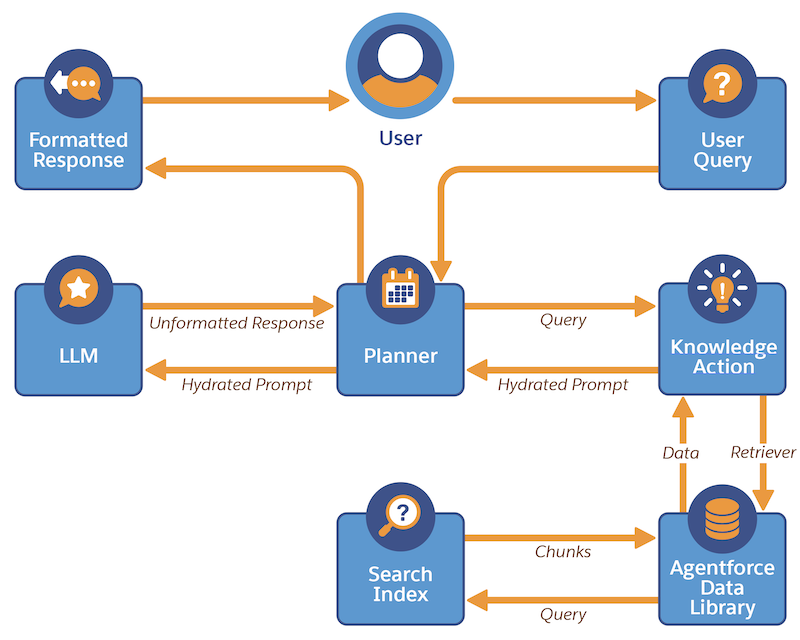
At runtime, the user’s query is added into the prompt template, which references a retriever that connects to relevant data. The system then combs through the search index to find the most pertinent information and incorporates it back into the prompt. The LLM receives this enriched prompt and takes the user’s query, the added information, and the prompt instructions to generate a response. The Service Planner then reviews this response to ensure that it aligns with the prompt instructions. Finally, the end user receives a response that answers the query contextualized with relevant, domain-specific information and tailored to the specific task.
Agent Actions and Data Libraries
Actions determine the jobs that an agent can do. Standard actions are included by default with your agents and can be built to work with specific products. For example, when a user asks an AI agent a question, the Answer Questions with Knowledge agent action is used to answer the query based on data in the corresponding Agentforce Data Library. See Assign a Data Library to Your Agent and Agent Action: Answer Questions with Knowledge.
