
Manage Salesforce Access to Customer Data
Choose whether to allow Salesforce to access Customer Data in your org. If shared, Salesforce has your consent to use Customer Data for specific purposes.
Required Editions
| Available in: Lightning Experience |
| Available in: Enterprise, Performance, Unlimited, and Developer Editions. |
| User Permissions Needed | |
|---|---|
| To view or change sharing consent | Opt Out of Customer Data Access |
Why Share Customer Data with Salesforce?
Sharing gives Salesforce consent to use Customer Data, as defined in our Main Services Agreement (MSA), in your org for the following purposes:
- Train global predictive AI models for use by the services and features to which you have access
- Improve the services and features to which you have access
- Conduct research into and development of new services and features

Note This data sharing setting doesn’t affect Salesforce’s zero-data retention (ZDR) policy
with third-party Large Language Models (LLMs).
Opting in allows you to:
- participate in pilot programs
- get early access to Agentforce and Einstein features
- improve the relevance of search results for terms that are specific to your Salesforce org or to your industry, and
- contribute to ongoing Salesforce efforts to improve certain products or services enabled in your Salesforce org.
Government Cloud or Organizational Consent
Note Starting Feb, 2026, all Government Cloud customers were opted out by
default.
Customer data access is allowed by default unless your organization:
- uses Government Cloud, or
- has decided to opt out, or has previously opted out, of sharing Customer Data with Salesforce.
If you get a read-only page, then your organization either uses Government Cloud or has opted out by some other means. In either case, you can’t turn it on.
Manage Consent for Data Sharing
- From Setup, in the Quick Find box, enter Einstein Setup, and then select Einstein Setup. Make sure that Einstein Setup is turned on in your org.
-
From Setup, in the Quick Find box, enter Opt Out of Customer Data
Access, and then select it.
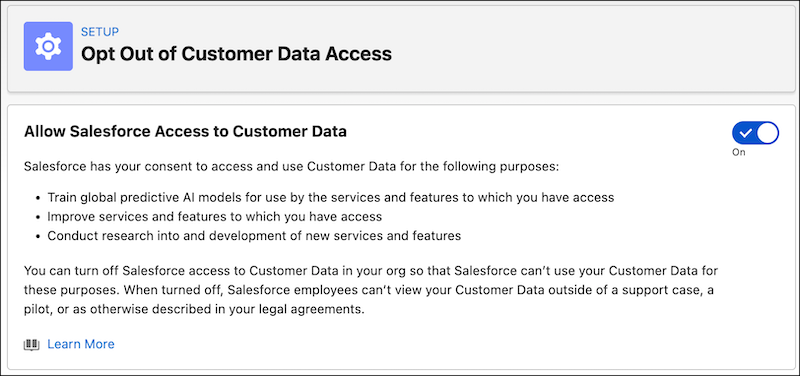
- If allowed, turn consent on or off.
What Happens If You Opt Out
If you turn off Salesforce access to Customer Data in your org after it has been turned on:
- No new data is shared. For service improvement purposes, Salesforce retains your collected data for up to 30 days, after which it’s deleted and can’t be recovered.
- No Salesforce employee will view your Customer Data outside of a support case, a pilot, or as otherwise described in your legal agreements.
Opting out of data sharing can have these impacts:
- Your org won’t be able to participate in pilot programs or get early access to Agentforce and Einstein features.
- Search results can be less relevant for terms specific to your Salesforce org or to your industry.
- Your org won’t contribute to ongoing Salesforce efforts to improve certain products or services enabled in this org.
Learn More
- Einstein and Data Usage
- Salesforce Einstein: Global Opt-out Process (off-line alternative to this process)
Did this article solve your issue?
Let us know so we can improve!
