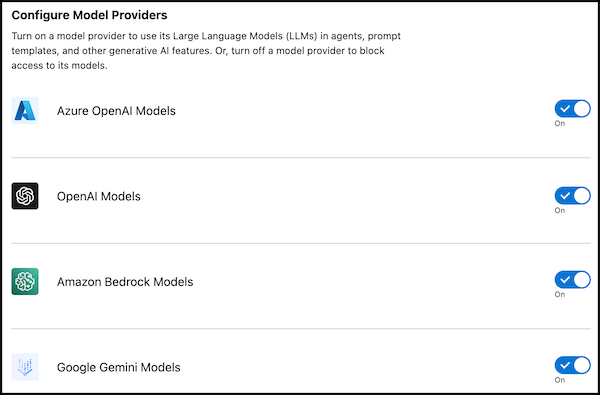
Choose which Large Language Model (LLM) providers to allow or not allow in your
organization. When access to a model provider is turned on, you can use its language learning
models (LLMs) in agents, prompt templates, APIs, and other features in generative AI solutions.
Turn off a model provider to block access to its models in your org.
Required Editions
Data Cloud in Developer, Enterprise, Performance, and
Unlimited editions.
Einstein generative AI is available in Lightning Experience. Setup for Einstein
generative AI is available in Lightning Experience.
Available in: Enterprise, Performance, and Unlimited Editions
with an Einstein for Sales, Einstein for Platform, Einstein for Service, Einstein 1 Service,
or Einstein GPT Service add-on. To purchase add-ons, contact your Salesforce account
executive.
User Permissions Needed
To change model provider access:
Admin permissions
Warning Turning off a model provider can stop Agentforce agents, prompt templates,
and other generative AI features that use its models from running. Be sure to test and verify
AI-enabled functionality in a sandbox org before you deploy it into production. Affected
components can include (but aren’t limited to):
Agentforce Agents
Agent Actions
Agentforce Testing Center
Prompt templates
APIs
Email Summaries
Knowledge Generation
Service Replies
Generative Campaigns
Sales Summaries
Agentforce API
Agentforce Vibes Extension
Salesforce features that access LLMs
To manage model provider access:
From Setup, in the Quick Find box, enter Einstein Setup.
Turn on Einstein if it’s not already turned on.
Scroll down to Configure Model Providers.
Selectively turn on or off model providers.
Usually, model providers are enabled by default. For Amazon Bedrock, currently only
Anthropic and Amazon models are affected.
If you turn off access for a model provider, you’re warned that disabling access stops affected components from running. Confirm your selection.
Important It can take up to ten (10) minutes for model provider
disablement to take effect.
Did this article solve your issue?
Let us know so we can improve!
Loading
Salesforce Help | Article
Cookie Consent Manager
Cookie Consent Manager
General Information
Required Cookies
Functional Cookies
Advertising Cookies
General Information
We use three kinds of cookies on our websites: required, functional, and advertising. You can choose whether functional and advertising cookies apply. Click on the different cookie categories to find out more about each category and to change the default settings.
Privacy Statement
Required Cookies
Always Active
Required cookies are necessary for basic website functionality. Some examples include: session cookies needed to transmit the website, authentication cookies, and security cookies.
Functional Cookies
Functional cookies enhance functions, performance, and services on the website. Some examples include: cookies used to analyze site traffic, cookies used for market research, and cookies used to display advertising that is not directed to a particular individual.
Advertising Cookies
Advertising cookies track activity across websites in order to understand a viewer’s interests, and direct them specific marketing. Some examples include: cookies used for remarketing, or interest-based advertising.