
Set Up Knowledge/RAG Quality Data and Metrics
Turn on Knowledge/RAG Quality Data and Metrics to collect and store, in Data 360, quality scores and other data about knowledge retrievals.
Required Editions
| Available in: Lightning Experience |
| Available in: Enterprise, Performance, Unlimited, and Developer Editions. Required add-on licenses vary by agent type. |
| User Permissions Needed | |
|---|---|
| To turn on data collection: | View Setup |
| AND | |
| Customize Application | |
Setup considerations:
- To access pre-built reports and dashboards, make sure that you have Data Cloud User permissions. See Create Data Cloud Users and Assign Permissions.
- If you use a data space that's shared with your companion org, confirm that the initialization status for the shared data space is Active. See Data Cloud One Monitoring and Companion Connection Statuses.
- Confirm that Data Cloud is provisioned in your Salesforce org and that you’ve turned on Einstein. To learn more, see Set Up Einstein Generative AI.
- Verify that you have the latest version of the Salesforce Standard Data Model (version 1.130 or higher) in your org (sandbox or production). From Setup, go to Apps -> Packaging -> Installed Packages -> Salesforce Standard Data Model. To get the required version, click here and follow the instructions.
- From Setup, in the Quick Find box, enter Einstein Audit, Analytics, and Monitoring Setup, and then select Einstein Audit, Analytics, and Monitoring Setup.
- Confirm that Audit and Feedback is turned on. To learn more, see Set Up Einstein Generative AI Audit and Feedback.
-
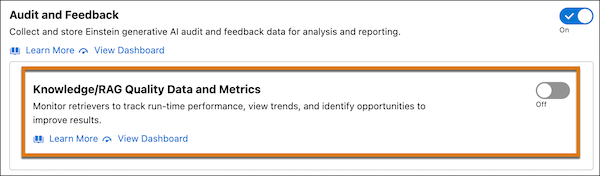
Scroll down to Knowledge/RAG Quality Data and Metrics.
-
Turn Knowledge/RAG Quality Data and Metrics on or off.
-
Turn on Knowledge/RAG Quality Data and Metrics to provision your
data model (in just a few minutes) and start collecting data in Data 360. Data collection
occurs every five minutes, data processing occurs every hour, and data reporting is
aggregated daily.
Turning on Knowledge/RAG Quality Data and Metrics increases your org’s Flex credit consumption rate for LLM calls (see Flex Credits Billable Usage Types).
-
Turn off Knowledge/RAG Quality Data and Metrics to stop collecting
data.
Suspending data collection keeps your existing data so that you can resume later. Dashboards, queries, and reports show a gap during which data collection is turned off.
-
Turn on Knowledge/RAG Quality Data and Metrics to provision your
data model (in just a few minutes) and start collecting data in Data 360. Data collection
occurs every five minutes, data processing occurs every hour, and data reporting is
aggregated daily.
- If prompted (for example, if you turn on data collection on and your org has multiple data spaces), select a target data space to store the data.
-
Optionally, adjust the sampling rate, which is the percentage of retrievals you want to
score and analyze. The default sample rate is
50%.
An LLM scores retrieval quality, which consumes Flex credits. As RAG quality scores stabilize over time, consider lowering the sample rate to reduce the number of LLM calls and Flex credit consumption.
- To protect access to collected data that is sensitive, apply permissions at the dataspace level. That way, only authorized users can view or query this data. See Implement Data Governance Permissions for Agentforce Session Tracing Objects.
Did this article solve your issue?
Let us know so we can improve!
