
Data Model for Agent Optimization
Agent Optimization extends Session Tracing Data Model (STDM) capabilities by provisioning additional data model elements that track session moments and user intent. An LLM identifies, clusters, and tags these moments. The resulting information enables targeted queries and insights into user engagement metrics, moment duration, and response relevance quality scores.
Required Editions
| Available in: Enterprise, Performance, and Unlimited Editions with an Einstein for Sales, Einstein for Platform, Einstein for Service, Einstein 1 Service, or Einstein GPT Service add-on. To purchase add-ons, contact your Salesforce account executive. |
Agent Optimization Data Model Elements
When you turn on Agent Optimization, the system provisions a data model in Data 360 to track agent interactions and moments. Elements include a data stream and its target Data Lake Object (DLO), and a semantic data model (SDM) with:
- Entities such as DMOs and Logical Views
- Relationships that define the joins and connections among different SDM entities.
- Dimensions and Measurements
This illustration shows key elements.
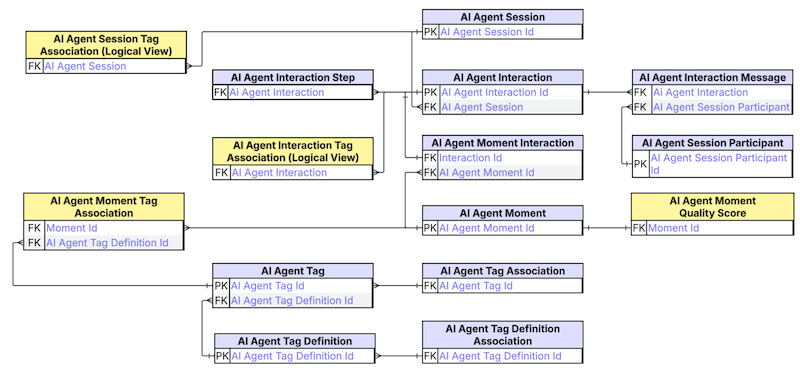
| DLO/DMO | Description |
|---|---|
AiAgentMoment
|
Represents a group of consecutive interactions that share the same intent, collectively forming a coherent moment within the user experience. |
AiAgentMomentInteraction
|
A junction object indicating which interactions are part of a given moment. |
AiAgentTagDefinition
|
Defines a tag type that you can use to annotate AI agent moments or sessions, including metadata such as the tag's name, type, or category. |
AiAgentTagDefinitionAssociation
|
Associates a tag definition with a specific AI agent, indicating which tags are available for use by that agent. |
AiAgentTag
|
Represents an instance of a tag definition with a specific value applied to a particular moment or session. |
AiAgentTagAssociation
|
Associates a tag with a specific moment or session, enabling structured annotation for analysis or filtering. |
Agent Optimization Calculated Fields
Investigate agent performance and calculate session metrics. Session tracing makes it easier to get granular insights when you join several calculated fields together. For example, you can check your agent performance in specific session moments by combining the "Unique Moments" and "Average Quality Score" fields. The "Average Quality Score" field refers to how relevant an agent's response was to a user's request.
Dimensions are categorical or descriptive attributes that you can use to slice, filter, and group your data. For example, segmenting your agent performance data by time periods, status types, or quality categories.
| Field Name | Description |
|---|---|
Abandonment_Status_clc |
Indicates whether a user has left the session. |
Agent_Interaction_Latency_clc |
The time it takes the agent to respond to the user's request, in milliseconds. |
Deflection_Status_clc |
The deflection status, indicating if the session ended at the user's request. |
Engagement_Status_clc |
Specifying if a user received a reply based on an agent triggered action. An agent action is a predefined step within a subagent workflow. |
Escalation_Status_clc |
Specifying whether the escalation is a result of a session that moved to a different agent. |
Is_Session_Ended_clc |
Specifying if the session has ended. |
Is_User_clc |
Specifying if the entity is an agent or a user. |
Moment_Duration_clc |
The moment duration, in seconds. |
Quality_Score_clc |
A quality score, ranging from 1 (lowest) to 5 (highest). Indicates how relevant the agent's response was to the user's request. |
Session_Duration_clc |
The session duration, in seconds. |
Measures are quantitative values that can be aggregated, calculated, or compared. They represent the key performance indicators and metrics used to evaluate agent performance, such as counts, rates, averages, and percentages.
| Field Name | Description |
|---|---|
Abandonment_Rate_clc |
The abandonment rate percentage. Calculated by dividing the number of abandoned sessions by all sessions. |
Abandoned_Sessions_clc |
The number of sessions where the user left because of an error, browser crash, or time out. |
Average_Agent_Interaction_Latency_clc |
The average time it takes the agent to respond to the user's request, in milliseconds. |
Average_Interactions_Per_Session_clc |
The average number of interactions per session. |
Average_Moment_Duration_clc |
The average moment duration, in seconds. |
Average_Quality_Score_clc |
An average score, ranging from 1 (lowest) to 5 (highest). Indicates how relevant the agent's response was to the user's request across multiple sessions. |
Average_Session_Duration_clc |
The average session duration, in seconds. |
Average_User_Interactions_clc |
The average number of user interactions across all sessions. |
Deflection_Rate_clc |
The deflection rate percentage, calculated by dividing the number of deflected sessions by all sessions. |
Deflected_Sessions_clc |
The number of sessions ended by the user or otherwise, but not by escalation or abandonment. |
Engagement_Rate_clc |
The engagement rate percentage, calculated by dividing the number of engaged sessions by the number of sessions. |
Engaged_Sessions_clc |
The number of sessions where the user received a reply based on an agent triggered action. An agent action is a predefined step within a subagent workflow. |
Escalation_Rate_clc |
The escalation rate percentage, calculated by dividing the number of escalated sessions by all sessions. |
Escalated_Sessions_clc |
The number of sessions where an agent escalated a session to a human or a different agent. |
Quality_Score_Reasoning_clc |
The explanation for an assigned quality score. |
Success_Rate_clc |
The success rate calculated as the percentage of interactions where an agent's action-based response was provided, out of all interactions. |
Unique_Interactions_clc |
The number of distinct user and agent interactions recorded within a defined timeframe. An interaction consists of a user's request plus an agent's response. |
Unique_Moments_clc |
The number of distinct moments recorded within a defined time frame. Each moment aggregates multiple user and agent interactions centered on a specific request. |
Unique_Sessions_clc |
The number of distinct sessions recorded within a defined time frame. A session includes the entire exchange between a user and an agent. |
Unique_Tags_clc |
The number of unique tags created within a defined time frame. |
Unique_Users_clc |
The number of distinct users interacting with the agent within a defined time frame. |
