
Get Insights from Agent Session Tracing Data
To analyze Agentforce session tracing data, you can use observability dashboards, run queries, and build Data 360 reports using the data model.
Required Editions
| Available in: Enterprise, Performance, and Unlimited Editions with an Einstein for Sales, Einstein for Platform, Einstein for Service, Einstein 1 Service, or Einstein GPT Service add-on. To purchase add-ons, contact your Salesforce account executive. |
| User Permissions Needed | |
|---|---|
| To view and access reports and dashboards | Data Cloud User |
To access any pre-built reports and dashboards, make sure you have Data Cloud User permissions. See Create Data Cloud Users and Assign Permissions.
Observability Dashboards
Visualize session tracing data using these out-of-the-box observability features:
- Agent Analytics analyzes your AI agents’ performance within user and agent sessions. To get started, see Set Up Agent Analytics.
- Agent Optimization allows you to inspect agent sessions from the initial user request to the agent’s resolution. To get started, see Set Up Agent Optimization.
Example: Simple Query
SELECT *
          FROM "AiAgentSession__dlm"
          JOIN "AiAgentSessionParticipant__dlm" ON "AiAgentSession__dlm"."id__c" = "AiAgentSessionParticipant__dlm"."aiAgentSessionId__c"
          JOIN "AiAgentInteraction__dlm" ON "AiAgentSession__dlm"."id__c" = "AiAgentInteraction__dlm"."aiAgentSessionId__c"
          JOIN "AiAgentInteractionMessage__dlm" ON
          "AiAgentInteraction__dlm"."id__c" = "AiAgentInteractionMessage__dlm"."aiAgentInteractionId__c"
          JOIN "AiAgentInteractionStep__dlm" ON
          "AiAgentInteraction__dlm"."id__c" = "AiAgentInteractionStep__dlm"."aiAgentInteractionId__c"
          WHERE "AiAgentSession__dlm"."id__c" = 'your_uuid'
          LIMIT 10
where your_uuid is a user-specified UUID.
Example: Get Recent Sessions
The following example query gets a list of recent sessions. You can change the internal days to see the session count data.
SELECT
          ssot__Id__c,
          ssot__StartTimestamp__c
          FROM ssot__AiAgentSession__dlm s
          WHERE s.ssot__StartTimestamp__c >= current_date - INTERVAL '7' DAY
          ORDER BY s.ssot__StartTimestamp__c DESC;
Example: Get All Messages Within an Interaction
The following example query gets all messages (user text or agent text) within a given interaction. It searches by interaction ID.
SELECT
          ssot__AiAgentInteractionId__c AS InteractionId,
          ssot__AiAgentInteractionMessageType__c,          -- user or agent
          ssot__AiAgentInteractionMsgContentType__c,          -- e.g., text
          ssot__ContentText__c,
          ssot__AiAgentSessionParticipantId__c AS SenderParticipantId,
          ssot__ParentMessageId__c       -- if part of a thread
          FROM "ssot__AiAgentInteractionMessage__dlm"
          WHERE ssot__AiAgentInteractionId__c = '<given-interaction-id>' --'0199aac4-1047-70f3-8311-94d0d1678bb4'
            ORDER BY ssot__MessageSentTimestamp__c ASC;
Example: Find Interaction Steps With Errors
The following example query gets all interaction steps with errors.
SELECT
          ssot__AiAgentInteractionId__c AS InteractionId,
          ssot__Id__c AS StepId,
          ssot__Name__c AS StepName,
          ssot__InputValueText__c AS Input,
          ssot__ErrorMessageText__c AS StepErrorMessage
          FROM "ssot__AiAgentInteractionStep__dlm"
          WHERE length(ssot__ErrorMessageText__c) > 0 AND ssot__ErrorMessageText__c != 'NOT_SET'
          LIMIT 100;
Example: Integrate Feedback or Guardrails Metrics
The Session Trace data model includes reference fields for every LLM call the
reasoning engine makes (generationRequestId, generationId,
and gatewayResponseId). To incorporate feedback data or guardrails metrics
in your analysis, join these fields when writing queries and building reports. Example:
SELECT *
          FROM "AiAgentSession__dlm"
          JOIN "AiAgentSessionParticipant__dlm" ON "AiAgentSession__dlm"."id__c" = "AiAgentSessionParticipant__dlm"."aiAgentSessionId__c"
          JOIN "AiAgentInteraction__dlm" ON "AiAgentSession__dlm"."id__c" = "AiAgentInteraction__dlm"."aiAgentSessionId__c"
          JOIN "AiAgentInteractionMessage__dlm" ON "AiAgentInteraction__dlm"."id__c" = "AiAgentInteractionMessage__dlm"."aiAgentInteractionId__c"
          JOIN "AiAgentInteractionStep__dlm" ON "AiAgentInteraction__dlm"."id__c" = "AiAgentInteractionStep__dlm"."aiAgentInteractionId__c"
          LIMIT 10
Example: Get Interactions from Session Tracing and Feedback Data
The following example query gets a list of interactions from session tracing and feedback from Audit and Feedback data.
  SELECT
    step.ssot__AiAgentInteractionId__c  AS InteractionId,
    step.ssot__Name__c                  AS StepName,
    req.prompt__c                       AS InputPrompt,
    gen.responseText__c                 AS LLMResponse,
    fb.feedback__c                      AS Feedback
  FROM ssot__AiAgentInteractionStep__dlm step
  JOIN GenAIGatewayRequest__dlm req
    ON step.ssot__GenAiGatewayRequestId__c = req.gatewayRequestId__c
  JOIN GenAIGeneration__dlm gen
    ON step.ssot__GenerationId__c = gen.generationId__c
  LEFT JOIN GenAIFeedback__dlm fb
    ON req.generationGroupId__c = fb.generationGroupId__c
  LIMIT 100
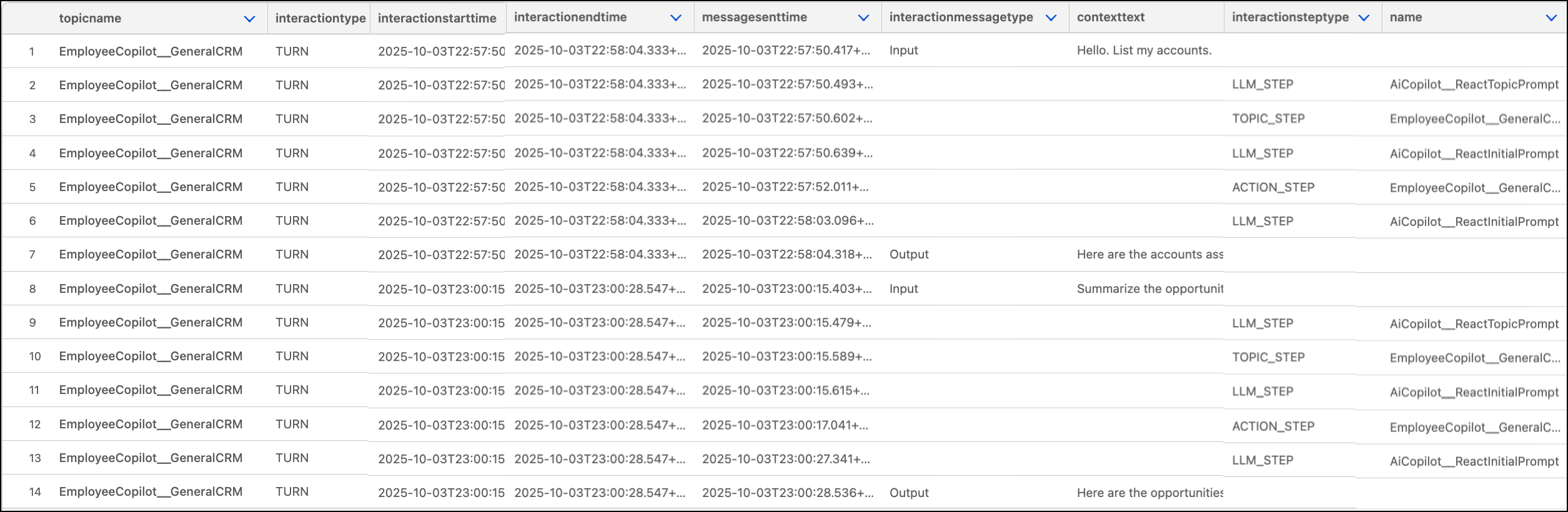
Example: Retrieve a Session’s Related Records in a Flat List
One agent session contains many records from related objects. Use this query to see
all of a session’s records in a flattened list sorted by timestamp. Replace <your
sessionID> with your sessionID.
WITH
            -- Keep session ID in temp table for easier reference
            params AS (
            SELECT
            '<your sessionID>' AS session_id
            ),
            -- Retrieve the agent interactions and agent interaction messages to see each turn and input/output messages per turn
            interactionsWithMessages AS (
            SELECT
            I.ssot__AiAgentInteractionType__c AS InteractionType,
            I.ssot__StartTimestamp__c AS InteractionStartTime,
            I.ssot__EndTimestamp__c AS InteractionEndTime,
            I.ssot__TopicApiName__c AS TopicName,
            M.ssot__MessageSentTimestamp__c AS MessageSentTime,
            M.ssot__ContentText__c AS ContextText,
            M.ssot__AiAgentInteractionMessageType__c AS InteractionMessageType
            FROM
            ssot__AiAgentSession__dlm AS S
            JOIN ssot__AiAgentInteraction__dlm AS I ON S.ssot__id__c = I.ssot__aiAgentSessionId__c
            JOIN ssot__AiAgentInteractionMessage__dlm AS M ON I.ssot__id__c = M.ssot__aiAgentInteractionId__c
            JOIN params AS p ON S.ssot__Id__c = p.session_id
            ),
            -- Retrieve the agent interactions and agent interaction steps performed on each turn by the agent to generate its output
            interactionsWithSteps AS (
            SELECT
            I.ssot__AiAgentInteractionType__c AS InteractionType,
            I.ssot__StartTimestamp__c AS InteractionStartTime,
            I.ssot__EndTimestamp__c AS InteractionEndTime,
            I.ssot__TopicApiName__c AS TopicName,
            St.ssot__AiAgentInteractionStepType__c AS InteractionStepType,
            St.ssot__Name__c AS Name,
            St.ssot__InputValueText__c AS InputValueText,
            St.ssot__OutputValueText__c AS OutputValueText,
            St.ssot__StartTimestamp__c AS InteractionStepStartTime,
            St.ssot__PreStepVariableText__c AS PreStepVariableText,
            St.ssot__PostStepVariableText__c AS PostStepVariableText
            FROM
            ssot__AiAgentSession__dlm AS S
            JOIN ssot__AiAgentInteraction__dlm AS I ON S.ssot__id__c = I.ssot__aiAgentSessionId__c
            JOIN ssot__AiAgentInteractionStep__dlm AS St ON I.ssot__id__c = St.ssot__aiAgentInteractionId__c
            JOIN params AS p ON S.ssot__Id__c = p.session_id
            ),
            -- Join both data sets
            interactionsWithMessagesAndSteps AS (
            SELECT
            *,
            CAST(NULL AS VARCHAR) AS InteractionStepType,
            CAST(NULL AS VARCHAR) AS Name,
            CAST(NULL AS VARCHAR) AS InputValueText,
            CAST(NULL AS VARCHAR) AS OutputValueText,
            CAST(NULL AS VARCHAR) AS PreStepVariableText,
            CAST(NULL AS VARCHAR) AS PostStepVariableText
            FROM
            interactionsWithMessages
            UNION ALL
            SELECT
            InteractionType,
            InteractionStartTime,
            InteractionEndTime,
            TopicName,
            -- Use InteractionStepStartTime as MessageSentTime to sort unified records
            InteractionStepStartTime AS MessageSentTime,
            CAST(NULL AS VARCHAR) AS ContextText,
            CAST(NULL AS VARCHAR) AS InteractionMessageType,
            InteractionStepType,
            Name,
            InputValueText,
            OutputValueText,
            PreStepVariableText,
            PostStepVariableText
            FROM
            interactionsWithSteps
            )
            -- Reorder fields and sort them by MessageSentTime
            SELECT
            TopicName, InteractionType, InteractionStartTime, InteractionEndTime,
            MessageSentTime, InteractionMessageType, ContextText,
            InteractionStepType, Name, InputValueText, OutputValueText, PreStepVariableText, PostStepVariableText
            FROM interactionsWithMessagesAndSteps
            ORDER BY MessageSentTime ASC
Example: list of records for a session
Build Data 360 Reports
To analyze Agentforce session trace data, build reports in Data 360 that pull relevant information from the DMOs in the session tracing data model. You can use calculated insights to create metrics that can trigger alerts. To learn more, including required permissions, see Data 360 Reports and Dashboards.
