
You are here:
Prompt Template Run-time Execution
Invoking a prompt template at run time sets off a chain of events. The run-time life cycle of a prompt template begins with loading the prompt template with input and concludes with forwarding the LLM-generated response to the calling agent or app.
Design-time Preview
When you design a prompt template, Prompt Builder’s preview feature allows you to simulate a complete run-time experience. You preview the prompt template, provide input, preview the resolved prompt, and then get the generated response returned from the LLM.
Prompt Execution at Run Time
When an agent or app invokes an activated prompt template at run time, it triggers the same chain of events. Let’s break it down into more detailed steps.
Prompt Template Execution Steps
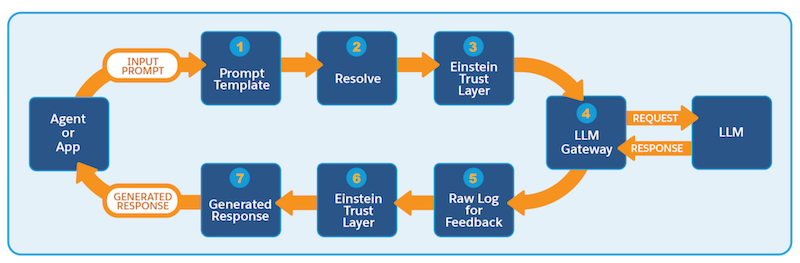
| Step | Description |
|---|---|
| 1 | The prompt template gets invoked with input from an agent, a flow, Apex, or an app. |
| 2 | Prompt resolution begins with secure data retrievals. Values for merge fields (records, flows, Apex) are added to the prompt. Access to merge data is governed by the permissions of the executing user. For dynamic grounding, relevant information from structured and unstructured data in Data Cloud is retrieved using features like search retrievers, flows, and SOQL queries. |
| 3 | The resolved prompt then undergoes further protections using enabled features in the Einstein Trust Layer. Pattern-based data masking is applied automatically, while field-based data masking is applied if enabled. The Einstein Trust Layer applies prompt defense measures using Salesforce system policies. |
| 4 | The secured prompt is submitted to the LLM via the LLM gateway. The LLM returns its generated response via the LLM gateway.
For external model providers, our zero data retention policy ensures that data sent to the LLM from Salesforce isn’t retained but is deleted after a response is sent back to Salesforce. |
| 5 | The LLM-generated response is logged for audit and feedback. |
| 6 | The Einstein Trust Layer applies system policies to the LLM-generated response. If enabled, features like toxicity detection help decrease the likelihood of unintended or harmful outputs. If data masking is enabled, the Einstein Trust Layer demasks any masked data, replacing placeholders with their underlying values. |
| 7 | The generated response is returned to the requesting agent or app in a raw or structured format. |

