Example Implementation of a Secure Agentforce Service Agent
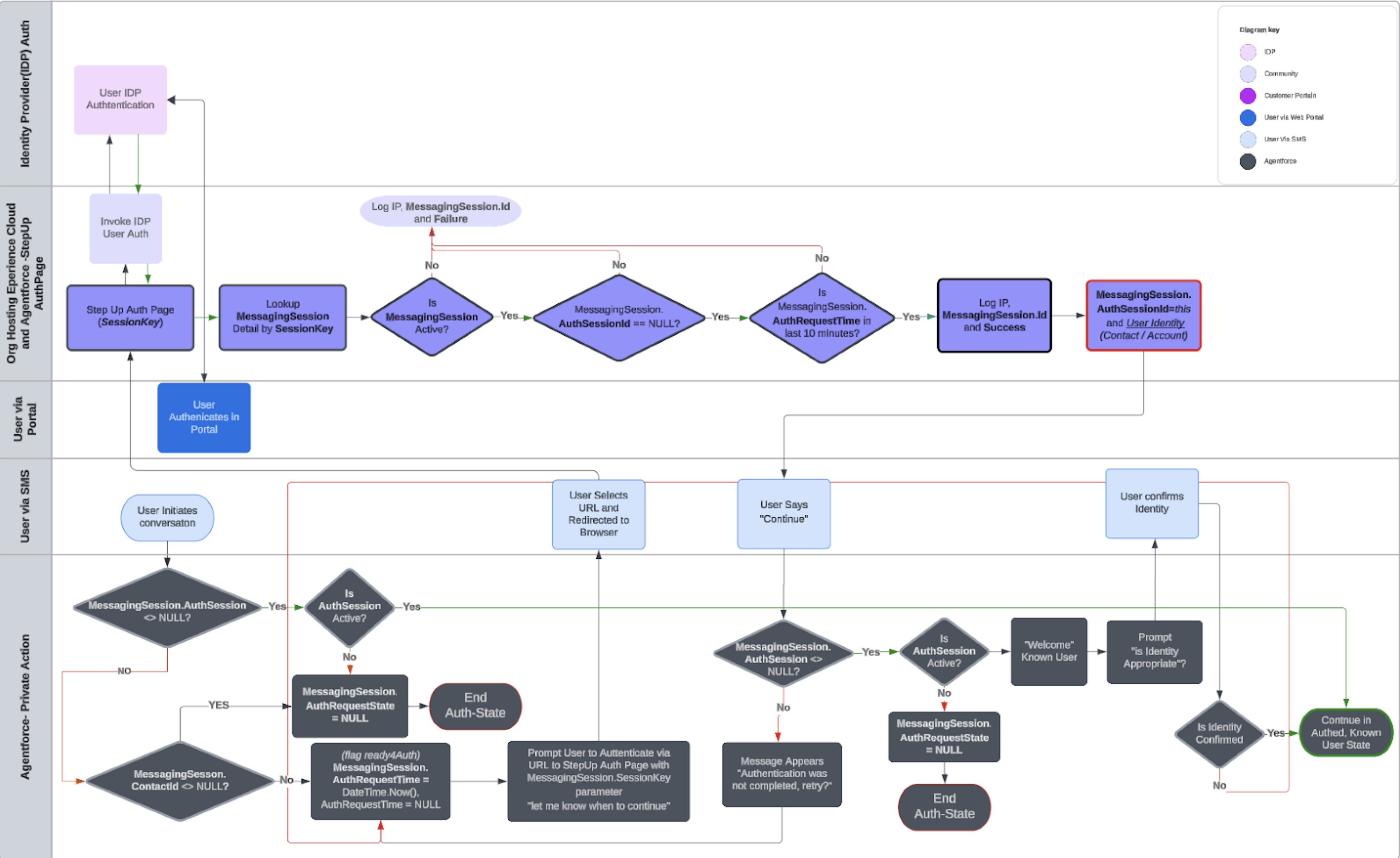
The details of implementing secure Agentforce Service agents vary depending on where the agent is deployed and the surrounding user authentication policies. To get a feel for the underlying patterns, let’s look at an example.
Required Editions
| Available in: Lightning Experience |
| Available in: Enterprise, Performance, Unlimited, and Developer Editions. Required add-on licenses vary by agent type. |
When your Agentforce Service agent is deployed to an Experience site, it’s sometimes necessary to reauthenticate the users interacting with your agent. In such cases, authentication within the session can be invoked.
Users can be authenticated by providing them with a parameterized URL within the conversation. The parameterized URL should reference a secure method on the Experience Cloud portal. To prepare for external authentication before sending the parameterized URL, the MessagingSession object is configured with these custom fields.
| Field | Initial Value | Definition |
|---|---|---|
| AuthSessionId | NULL | Identifies if there’s an AuthSession currently linked to this MessagingSession. This indicates whether the messaging session is authenticated. |
| AuthRequestTime | DateTime.Now() | Stores when authentication was requested, limiting the MessagingSession from being assigned identities outside of the directed window and allowing control of the timeframe during which external authentication is allowed. |
| AccountId | NULL | Ensures that the Account linked to the authenticated session is assigned relative to the Contact authenticated in the ExperienceCloud portal. |
| ContactId | NULL | Ensures that the Contact linked to the authenticated session is assigned relative to the Contact authenticated in the ExperienceCloud portal. |
The Apex Method handling the parameterized URL accepts the MessagingSession.SessionKey field. This Globally Unique Identifier (GUID) is unique to MessagingSession records where Status = “Active”. This method looks up the related MessagingSession records with this query.
SELECT Id, Conversation.ConversationIdentifier, Status, FROM MessagingSession
WHERE SessionKey = '1db8a0ab-aae4-4ed9-b6d5-3e7fe85b9574' AND Status = 'Active'
AND AuthSessionId__c = NULL
If this query returns a record, that record represents a conversation with an Agentforce Service agent where the user has been authenticated. The returned record can then be updated to represent the relationship to the current AuthSession of the Experience Cloud portal. For instance, if the MessagingSession is defined as ms.
ms.AuthSessionId__c = SessionManagment.GetCurrentSession().get('SessionId');
User authUser = [SELECT Id, ContactId, AccountId from User WHERE Id = :UserInfo.getUserId()];
ms.AccountId__c = authUser.AccountId;
ms.ContactId__c = authUser.ContactId;
ms.commit();
The Agentforce Service agent now has the information it needs to confirm the user’s identity when taking private actions. It also has the ID of the AuthSession, which can be terminated as soon as the conversation in the corresponding portal session ends.
In this example the user is directed to a portal page where they will authenticate to the side. This will update the MessagingSession record for the AgentForce session with the user's identity. It will not however generate an event in the AgentForce session so is dependent on the user continuing the conversation in AgentForce, once authentication is complete.